Do you ever feel like you’re drowning in receipts, mystery transactions, and month-end chaos?
Here’s the truth: 82% of small businesses fail because of poor cash flow management, not because they weren’t profitable on paper.
The difference between staying afloat and going under often comes down to one simple habit: daily accounting tasks. When you wait until month-end to catch up, you’re not just creating stress; you’re making decisions with outdated data that could cost you thousands.
This guide shows you exactly what to do every single day, week, and month to keep your books clean, your cash flowing, and your sanity intact.
Key Takeaways
- The 6 essential daily accounting tasks that take just 20-30 minutes but save you 10+ hours at month-end
- How to spot the 7 costly mistakes that drain cash and trigger IRS penalties
- Weekly and monthly routines that keep your financial statements audit-ready
- When automation saves you money (and when it doesn’t)
- Free downloadable checklist to build sustainable accounting habits
Why Do Daily Accounting Tasks Matter for Small Businesses?
Daily accounting tasks help you avoid cash flow problems, fix errors before they become serious, and provide real-time insights into your finances. Without these tasks, you risk operating without clear visibility.
Prevent Cash Flow Crises
Cash flow is about how much money you actually have, not how much you’ve sold. You can appear profitable while struggling to pay employees.
Daily cash flow monitoring helps you find problems early. If a $5,000 client payment doesn’t clear, you’ll know right away instead of discovering it when rent is due. You can also catch duplicate subscription charges and get refunds within 24 hours, preventing budget confusion.
Catch Errors Early
Imagine finding a $500 duplicate payment to a vendor. If you catch this today, you can make a quick 5-minute phone call, and the refund will likely be processed by tomorrow. If you wait 30 days to notice the error, you’ll have to review emails, search through records, and deal with the vendor, who might give you a hard time.
Studies show that each week you delay, the reconciliation process becomes 50% harder. Small mistakes can grow into costly problems that require many hours of detective work to fix.
Enable Better Decision-Making
Should you run a Facebook ad campaign, hire another salesperson, or order more inventory?
Daily accounting helps you make decisions based on recent data. Without it, you’re relying on numbers that are 30 to 60 days old, which is too slow for small businesses. Real-time data lets you adapt quickly.
If you see a spike in sales from yesterday, you can order more inventory today. If you notice a cash crunch coming next week, you can delay non-essential purchases now.
What Are the Essential Daily Accounting Tasks?
These 6 core tasks take 20-30 minutes daily when done consistently. Skip them, and you’ll spend 10+ hours at month-end piecing everything together.
1. Record and Categorize All Transactions
What it is: Log every dollar that comes in or goes out of your business, no exceptions.
How to do it:
Step 1: Check your bank feeds in QuickBooks, Xero, or Wave
Step 2: Categorize each transaction (Cost of Goods Sold, operating expenses, owner draws, etc.)
Step 3: Attach digital receipts using your phone or a receipt scanner
Why it matters: “Mystery transactions” at month-end are a nightmare. You’ll waste hours trying to remember what “AMZN MKTP $47.23” was for. Do it daily while it’s fresh.
Common Mistake: Avoid mixing personal and business transactions. Always use separate accounts for these purposes.
Time Required: 10-15 minutes
2. Reconcile Bank and Credit Card Accounts
What it is: Match what your accounting software shows against what your bank actually shows.
How to do it:
Step 1: Open today’s bank transactions (most banks update by 8 AM)
Step 2: Verify amounts match your records
Step 3: Flag any discrepancies immediately, don’t wait
Why it matters: This catches fraud, double charges, and bank errors before they become expensive problems.
According to a 2023 Federal Trade Commission report, businesses that reconcile daily catch fraudulent charges 87% faster.
Automation Tip: Modern accounting software auto-matches about 80% of transactions. You’re just reviewing the other 20%.
Time Required: 5-10 minutes
3. Process and Pay Outstanding Invoices
What it is: Review bills from vendors and schedule payments before they’re due.
How to do it:
Step 1: Check invoice due dates in your Accounts Payable (AP) system
Step 2: Verify the “three-way match”: Purchase Order + Receipt + Invoice all match
Step 3: Schedule payment or approve it in your AP system
Why it matters: Late fees range from $25 to $50 per invoice. Vendors remember late payers, so you want to avoid being a low priority during supply shortages.
Cash Flow Tip: Pay on day 29 of “Net 30” terms, not day 1. Keep your cash longer.
Time Required: 5-10 minutes
4. Generate and Send Customer Invoices
What it is: Bill your customers the same day you deliver work or ship products.
How to do it:
Step 1: Create an invoice with clear payment terms in your accounting software
Step 2: Send it via email with a “Pay Now” link (Stripe, PayPal, ACH)
Step 3: Log it in your Accounts Receivable (AR) system
Why it matters: Businesses that invoice within 24 hours see a 25% increase in on-time payments. The longer you wait, the more your customers forget the value you delivered.
Best Practice: For small amounts (under $500), invoice same-day. For larger projects, invoice upon milestone completion.
Time Required: 5-10 minutes
5. Review Cash Position and Upcoming Obligations
What it is: Check how much cash you have right now versus what bills are coming due in the next 7 days.
How to do it:
Step 1: Open your cash flow dashboard (every good accounting system has one)
Step 2: Review bills due in the next week
Step 3: Ensure you have enough balance to cover them
Why it matters: Overdraft fees, bounced checks, and missed payroll destroy your credibility. You need to know your cash position every single day.
Red Flag: If your cash balance is below one month of operating expenses, you’re in the danger zone.
Time Required: 3-5 minutes
6. Update Inventory Records (Product-Based Businesses)
What it is: Log the inventory you received today and the inventory you sold today.
How to do it:
Step 1: Update quantities based on today’s sales and deliveries
Step 2: Flag any items approaching reorder points
Step 3: Record damaged or returned goods
Why it matters: Accurate Cost of Goods Sold (COGS) calculation depends on accurate inventory counts. Plus, you don’t want to oversell items you don’t have.
E-commerce Note: Most platforms (Shopify, Amazon, etc.) auto-sync with accounting software like QuickBooks or Xero.
Time Required: 5-10 minutes
Download Your Free Daily Accounting Checklist

What Weekly and Monthly Accounting Tasks Keep Your Books Accurate?
Weekly tasks take 1-2 hours and include payroll processing, reviewing who owes you money, approving expenses, and verifying your daily work didn’t miss anything. Monthly tasks require 3-5 hours if your daily and weekly tasks are up to date.
Weekly Accounting Tasks Checklist
Task 1: Process Payroll and Tax Withholdings
Review employee timesheets and calculate pay by deducting taxes, insurance, and retirement contributions.
Submit payroll taxes according to your IRS schedule, either semi-weekly or monthly. Missing a deadline can result in penalties of up to 15%.
Remember: Non-exempt employees who work over 40 hours must receive 1.5 times their hourly rate, regardless of prior approval.
Task 2: Review Accounts Receivable Aging Report
This report shows which customers owe you money and how overdue they are (0-30 days, 31-60 days, 61-90 days, 90+ days).
Send friendly payment reminders to 30-day accounts. For 60+ day accounts, pick up the phone; email isn’t cutting it.
Benchmark: If more than 20% of your receivables are over 60 days old, you have a collection problem that needs to be fixed now.
Task 3: Review Accounts Payable Aging Report
Accounts payable is the opposite of accounts receivable (AR). It shows what you owe and when it is due.
You can schedule payments for your upcoming bills. Look for early payment discounts, like “2/10 Net 30,” which lets you take 2% off if you pay within 10 days. Also, avoid late payment penalties that can add 1.5% each month.
Task 4: Approve Employee Expense Reports
Review receipts for compliance with your expense policy (no personal items, receipts over $75 required, etc.). Verify transaction categorization. Schedule reimbursements within your standard timeframe (most companies pay within 7-14 days).
Delayed reimbursements hurt morale and may violate labor laws in some states.
Task 5: Backup Accounting Data
If you use cloud-based software like QuickBooks Online or Xero, your backups are automatic. With QuickBooks Desktop or similar local software, you must back up your data manually. Check that you can restore backups every three months. If you can’t restore a backup, it’s useless.
Keep your backups in a safe place, either off-site or encrypted in the cloud. Your office is at risk from floods, fires, or ransomware attacks, so don’t let your financial data disappear.
Month-End Accounting Checklist
Month-end tasks include reconciling all accounts (not just bank accounts), generating financial statements, comparing budget-to-actual performance, and filing sales tax returns.
Task 1: Complete Full Account Reconciliations
Daily reconciliation covers your main operating account. Monthly reconciliation covers everything else: credit cards, loans, payroll liabilities, Accounts Receivable, Accounts Payable, and any other accounts you’ve got.
Investigate every discrepancy, don’t just adjust to make things match. Document all adjusting entries to maintain an audit trail.
Task 2: Generate Financial Statements
This is the big three:
- Profit & Loss Statement (P&L): Shows revenue minus expenses = profit or loss
- Balance Sheet: Shows assets, liabilities, and equity at a specific point in time
- Cash Flow Statement: Shows where cash came from and where it went
Compare this month’s statements to last month’s and to your budget. Look for unusual changes, a sudden spike in office supplies, or a dip in gross margin that deserves investigation.
Task 3: Review Budget vs. Actual Performance
Create a variance report showing budgeted amounts, actual amounts, and the differences. Focus on variances over 10%.
For example, if you budgeted $5,000 for marketing but spent $7,500, investigate why. Did the campaign generate enough revenue to cover the overspending, or was the extra cost unjustified?
Use this analysis to adjust your forecasts, as budgets can change.
Task 4: Close the Accounting Period
Lock last month in your accounting system so no one can accidentally (or intentionally) change historical data. This creates a clean audit trail and prevents “oops, I dated that invoice wrong” situations from messing up your reports.
Archive all supporting documentation (receipts, invoices, bank statements) in a secure location. The IRS wants you to keep records for at least 3 years, but 7 is safer.
Task 5: Review and Adjust Inventory Valuation
Count high-value items each month. Remove any damaged, expired, or outdated inventory from your records. Keeping these items on your books can inflate your assets and distort your Cost of Goods Sold (COGS).
Recalculate COGS based on the actual inventory count. If you use a perpetual inventory system, make sure it matches your on-hand inventory.
Task 6: Prepare and File Sales Tax
Calculate sales tax for each jurisdiction, including state, county, and city. File and pay taxes according to each jurisdiction’s schedule, which is typically monthly or, in some cases, quarterly.
Keep records showing your nexus in each state where you collect tax. If you sell online, you likely have nexus in over 20 states.
Task 7: Run Payroll and HR Reports
Generate reports showing total compensation by department, benefits utilization, and contractor payments (for 1099 tracking).
These reports help you spot trends, like overtime creeping up or turnover increasing, before they become expensive problems.
When Should You Complete Quarterly and Annual Accounting Tasks?
Some accounting tasks do not occur daily, weekly, or monthly, but they are essential for compliance and the long-term financial health of a business.
Quarterly Accounting Tasks
- Estimated Tax Payments
If you’re a sole proprietor, partnership, or S Corporation shareholder, you need to pay estimated taxes quarterly using IRS Form 1040-ES. Miss a payment, and you’ll owe penalties and interest.
- Financial Statement Review with Stakeholders
Share quarterly financials with business partners, investors, or your board. This is when you discuss trends, address concerns, and align on strategy.
- Budget Reforecasting
Adjust your annual budget based on Q1, Q2, or Q3 performance. If revenue is tracking 20% ahead of plan, update your projections.
- Fixed Asset Depreciation Review
Verify depreciation schedules are calculating correctly. Major purchases (equipment, vehicles, computers) should be depreciated in accordance with IRS guidelines.
- Compliance Filings
File Form 941 (employer quarterly federal tax return) if you have employees. File state unemployment taxes. Miss these, and penalties stack up fast.
Annual Accounting Tasks
- Year-End Financial Statements Preparation
Finalize your annual P&L, Balance Sheet, and Cash Flow Statement. These get shared with tax preparers, lenders, and investors.
- W-2 and 1099 Preparation
Issue W-2s to employees and 1099s to contractors by January 31. File copies with the IRS and state agencies. Penalties for late filing start at $50 per form.
- Tax Return Preparation and Filing
Work with your CPA to file federal and state tax returns. Business structure determines your deadline (C-Corps: April 15, S-Corps/Partnerships: March 15, Sole Proprietors: April 15).
- Fixed Asset Audit
Physically verify that major assets still exist and are in use. Remove fully depreciated or disposed assets from your books.
- Financial Audit (If Required)
If you have investors, lenders, or surpass certain revenue thresholds, you may need an independent audit. Plan for this to take 4-6 weeks.
- Benefits Enrollment Updates
Open enrollment for health insurance, retirement plans, and other benefits typically happens in Q4. Ensure payroll deductions update January 1.
- Insurance Policy Renewals
Review and renew general liability, professional liability, workers’ compensation, and other business insurance.
What Are Common Daily Accounting Mistakes Small Businesses Make?
Many small business owners, even with good intentions, make common mistakes in their daily accounting.
Here are seven costly mistakes to watch out for, and tips on how to avoid them.
1. Mixing Personal and Business Expenses
The Problem: Using your business credit card for groceries or your personal card for office supplies creates a tangled mess. The IRS doesn’t like it, and it makes your financial statements worthless.
The Consequence: Audit red flags, inaccurate profit calculations, and denied deductions during tax time.
The Solution: Separate business bank accounts and credit cards. No exceptions, even if you’re a sole proprietor.
2. Delaying Transaction Recording
The Problem: “I’ll enter those receipts this weekend” becomes “I’ll catch up next month,” which ends up as a shoebox full of faded receipts you can’t decipher.
The Consequence: Missing receipts means missed deductions worth $5,000-15,000 annually for the average small business.
The Solution: Same-day logging. Use mobile apps like Expensify or Dext to snap a photo and categorize it in 30 seconds.
3. Skipping Daily Reconciliation
The Problem: “The bank statement comes monthly, so I’ll reconcile monthly.”
The Consequence: Fraudulent charges go unnoticed for weeks. Bank errors compound. Month-end reconciliation takes 10+ hours instead of 30 minutes.
The Solution: 5-minute daily review of bank feeds. Modern software auto-matches transactions; you’re just verifying.
4. Not Categorizing Transactions
The Problem: Everything gets dumped into “miscellaneous” or “general expense.”
The Consequence: Can’t track actual spending by category. Can’t identify cost-cutting opportunities. The tax preparer charges you extra to fix it.
The Solution: Set up a proper Chart of Accounts. Most accounting software includes industry-standard templates. Use them.
5. Ignoring Small Transactions
The Problem: “It’s only $15 for a domain renewal, I don’t need to record it.”
The Consequence: Death by a thousand cuts. Small transactions add up to thousands in untracked expenses.
The Solution: Track everything. Accounting apps auto-import from bank feeds, so there’s no excuse.
6. Forgetting to Invoice Immediately
The Problem: Waiting until Friday to invoice the week’s work, or worse, waiting until month-end.
The Consequence: Every day you delay invoicing is another day before you get paid. Late invoicing extends your cash conversion cycle by weeks.
The Solution: Invoice on the same day you complete the work or ship the products. Set up recurring invoices for subscription/retainer clients.
7. Not Backing Up Daily
The Problem: “I’ll back up when I remember to” or “It’s in the cloud, so I’m fine.”
The Consequence: Ransomware attack, hard drive failure, or accidental deletion wipes out months of financial data. Even cloud systems can have corrupted files.
The Solution: Cloud accounting with automatic backups (QuickBooks Online, Xero). If you’re using desktop software, schedule automated daily backups to an external drive and cloud storage.
How Can You Automate Daily Accounting Tasks?
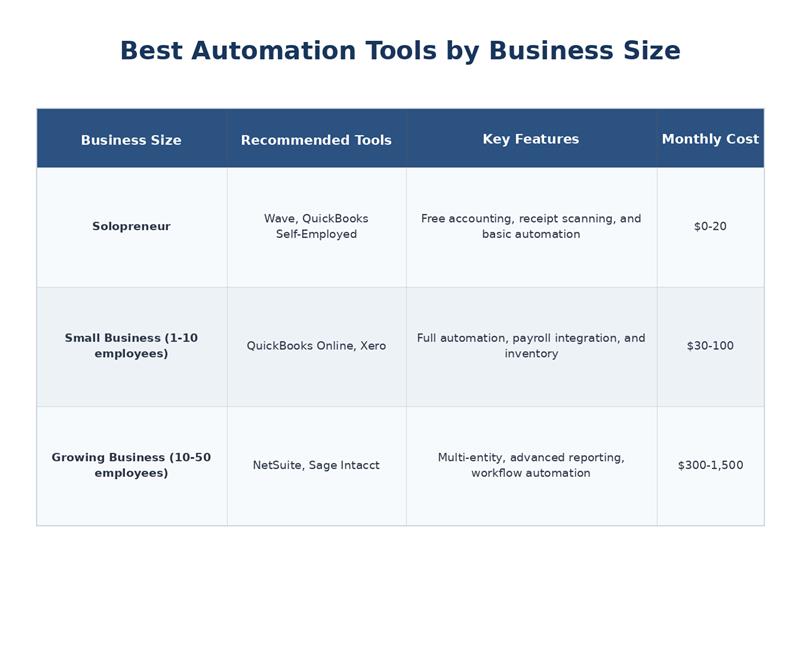
Automate your accounting tasks to eliminate repetitive data entry and reduce errors, making your work easier if you’re tired of the same monotonous process.
You can automate your task by choosing reliable accounting software and connecting it to your bank and payment systems. Set up recurring transactions for regular invoices and use automated reporting for insights. Receipt-scanning tools can help digitize and categorize documents, improving efficiency.
Automation can handle bank reconciliation, transaction categorization, invoice reminders, and sales tax calculations, allowing you to focus on review and decision-making.
What Can Be Automated?
- Bank Reconciliation: The software automatically pulls in your bank transactions and suggests matches based on your past actions. It can match 80-90% of transactions correctly on its own.
- Transaction Categorization: The software uses advanced algorithms to analyze merchant names and past behavior to categorize your transactions. For example, it always puts “Staples” under “Office Supplies.”
- Invoice Generation and Reminders: You can set up invoices to be sent out regularly for monthly services. The software automatically reminds you three days before the due date, on the due date, and three days after, with no extra effort required.
- Expense Report Approvals: Employees can take photos of their receipts using the mobile app. The software sends these to the manager for approval, per your company’s rules (for instance, expenses over $500 require director approval).
- Financial Report Generation: You can schedule reports, such as Profit and Loss statements, Balance Sheets, and Cash Flow Statements, to be generated and emailed automatically on the first of every month.
- Sales Tax Calculation: Tools like Avalara or TaxJar calculate sales tax based on the shipping location, product type, and local laws in all 50 states.
Conclusion
Spend 20-30 minutes daily on your finances to minimize month-end stress and catch errors early. Focus on these six tasks: record transactions, reconcile accounts, pay and send invoices, check cash flow, and update inventory.
Add weekly payroll checks, monthly financial statements, and compliance tasks. To simplify, use automation tools like bank feeds and reminders to cut your workload by 75%.
Whether you do it yourself or hire professionals, regular financial attention is vital for business success. Start by choosing three daily tasks and stick with them for two weeks to gain clarity in your finances.
Need help implementing these daily tasks?
Book a free consultation with Ledger Labs to discuss automated bookkeeping solutions customised to your business.
FAQs
Q: How long should daily accounting tasks take?
Daily accounting tasks should take 20-30 minutes for most small businesses when using accounting software with bank feed automation. Without automation, expect 60-90 minutes daily. E-commerce businesses may need 45 minutes due to multi-channel reconciliation and inventory tracking across platforms.
Q: What happens if I skip daily accounting tasks?
Skipping daily tasks creates a domino effect: month-end reconciliation takes 10+ hours instead of 2, you miss tax deductions worth $5,000-15,000 annually, late payment penalties average $250 per occurrence, and you increase audit risk due to poor recordkeeping. Small gaps become expensive disasters.
Q: Can I do accounting tasks weekly instead of daily?
You can do basic transaction recording weekly for very small businesses (under $50K revenue), but reconciliation should still be daily to catch fraud and errors quickly. The longer you wait, the harder it is to remember transaction details and find supporting documentation. Cash flow monitoring also requires daily attention.
Q: What tools do I need for daily accounting?
Essential tools include accounting software (QuickBooks, Xero, or Wave for free), a business bank account with online access, a receipt scanning app (Expensify or Dext), and a payment processor with accounting integration (Stripe, Square, PayPal). Total cost ranges from $50-300/month depending on features and business size.
Q: Should startups do all daily accounting tasks?
Startups should prioritize expense tracking, cash runway monitoring, and invoice management first. Add inventory tracking and full reconciliation once you have regular revenue. Pre-revenue startups can start with a spreadsheet but should move to real accounting software by the time revenue hits $10K/month. Early habits prevent expensive fixes later.