CPAs manage NetSuite accounting for SaaS companies by setting up ASC 606 revenue recognition in the Advanced Revenue Management module. They reconcile deferred revenue each period, link subscription billing and SaaS metrics to the general ledger, and review everything during the month-end close. NetSuite runs the schedule, while the CPA makes important decisions to ensure the numbers are accurate. This guide comes from the CPA and EA team who does this work, not from a vendor or setup partner.
Here’s the main issue that brings many SaaS founders to this guide: your dashboard shows $2 million in annual recurring revenue (ARR), but the deferred revenue schedule doesn’t match, and an auditor wants an explanation. This often happens because a generalist bookkeeper records subscription revenue as a one-time sale: they invoice and then recognize revenue. Everything seems fine until someone with a stake in the outcome looks closely.
To do it right, you must treat SaaS revenue as earned over the contract term, not when you bill. This requires properly setting up ASC 606 recognition, reconciling deferred revenue with active contracts, and pulling ledger metrics. You should review all this at every close, with someone who understands the contract.
If you get it right, your books close quickly, you pass audits smoothly, and you can handle fundraising without stress. The rest of this guide explains how each part works, starting with what makes SaaS accounting different from other businesses using NetSuite.
Key Takeaways
- CPAs configure ASC 606 in NetSuite’s Advanced Revenue Management, then review every schedule; the software can’t make the judgment calls alone.
- SaaS revenue is earned over the contract term, not when you bill, so deferred revenue must reconcile to active contracts each close.
- The deferred revenue roll-forward is the first control auditors check; if it doesn’t tie to recognition, a diligence team finds it.
- Billing platforms like Stripe must reconcile to the general ledger, or processor fees quietly understate your revenue every month.
- MRR, ARR, and NRR only survive diligence when they come from the GL, not a spreadsheet that no longer matches the books.
- A generalist records transactions; a CPA/EA team makes the ASC 606 calls that keep SaaS books defensible under scrutiny.
Why SaaS Accounting Is Different?
SaaS accounting is different because companies earn subscription revenue over the length of the contract, not just when they issue an invoice. This requires SaaS companies to defer revenue, recognize it evenly over time according to ASC 606, and track metrics like Monthly Recurring Revenue (MRR) and Annual Recurring Revenue (ARR). Managing these elements well helps pass audits; poor management can mislead stakeholders.
General bookkeeping fails to address this difference. In most businesses, an invoice signifies revenue; it reflects a sale, collects payment, and records the income. In SaaS, companies often receive a full year’s payment upfront for a service provided daily, causing a mismatch between invoice dates and earned revenue.
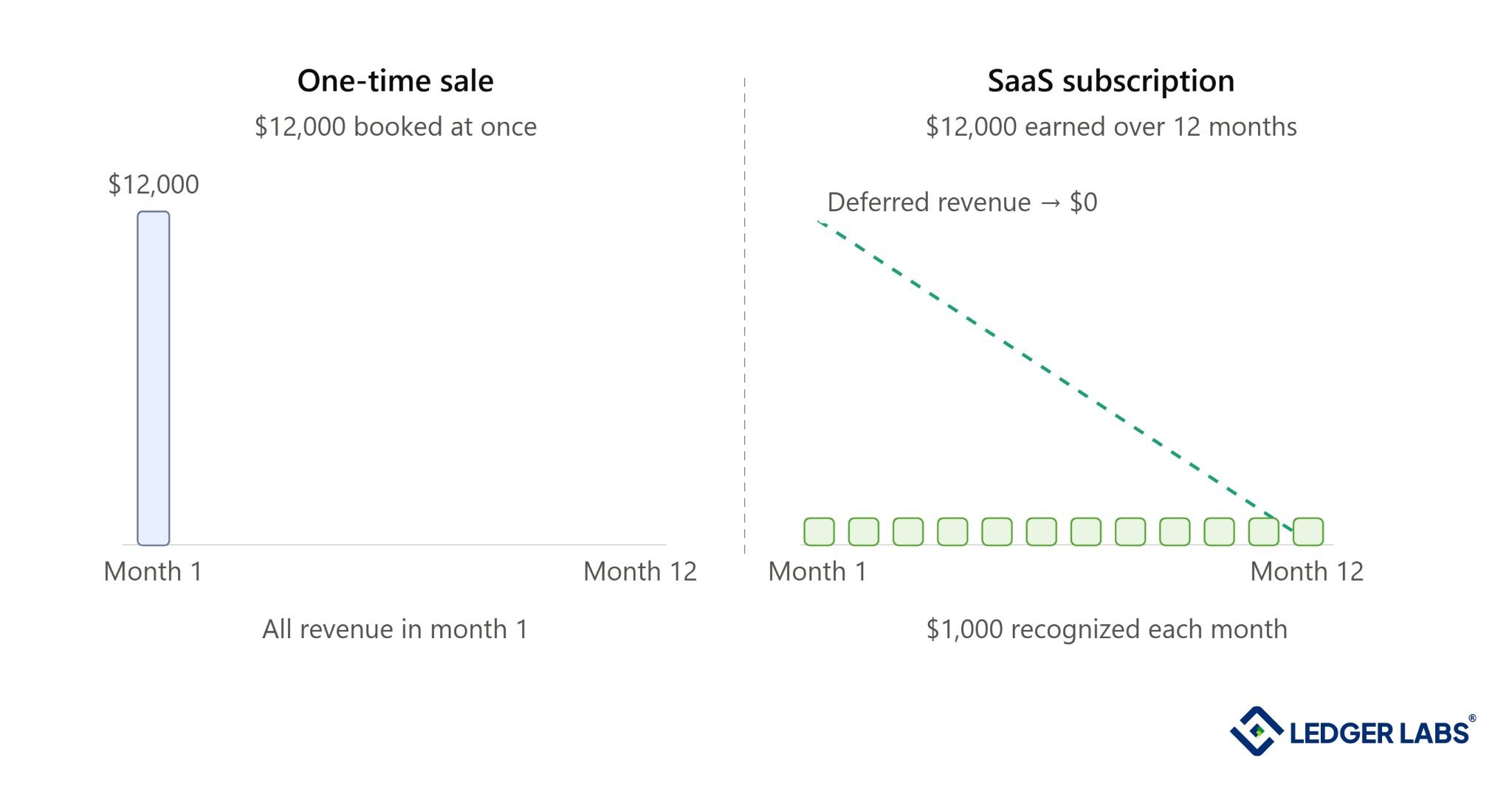
Book that annual invoice as revenue the day you raise it, and you overstate this month, understate the next eleven, and hand your future self a balance sheet that won’t survive scrutiny.
Three main factors set SaaS accounting apart from other businesses using NetSuite:
- Deferred revenue: Cash you receive now but earn later. You record it as a liability until you deliver the service.
- ASC 606 revenue recognition: This is the US GAAP rule that determines when you recognize revenue, based on when you earn it, not when you bill it.
- SaaS metrics: Metrics like Monthly Recurring Revenue (MRR), Annual Recurring Revenue (ARR), and churn rates only matter if they connect back to the general ledger.
Many businesses get their SaaS accounting wrong because the person managing it treats subscriptions like product sales. This might not seem like a problem to the founder, but it can fail when an auditor or an investor’s diligence team takes a close look at the numbers, especially when clear answers are needed most.
The hardest of these issues is revenue recognition, so that’s where we will begin.
How Does NetSuite Handle ASC 606 Revenue Recognition for SaaS?
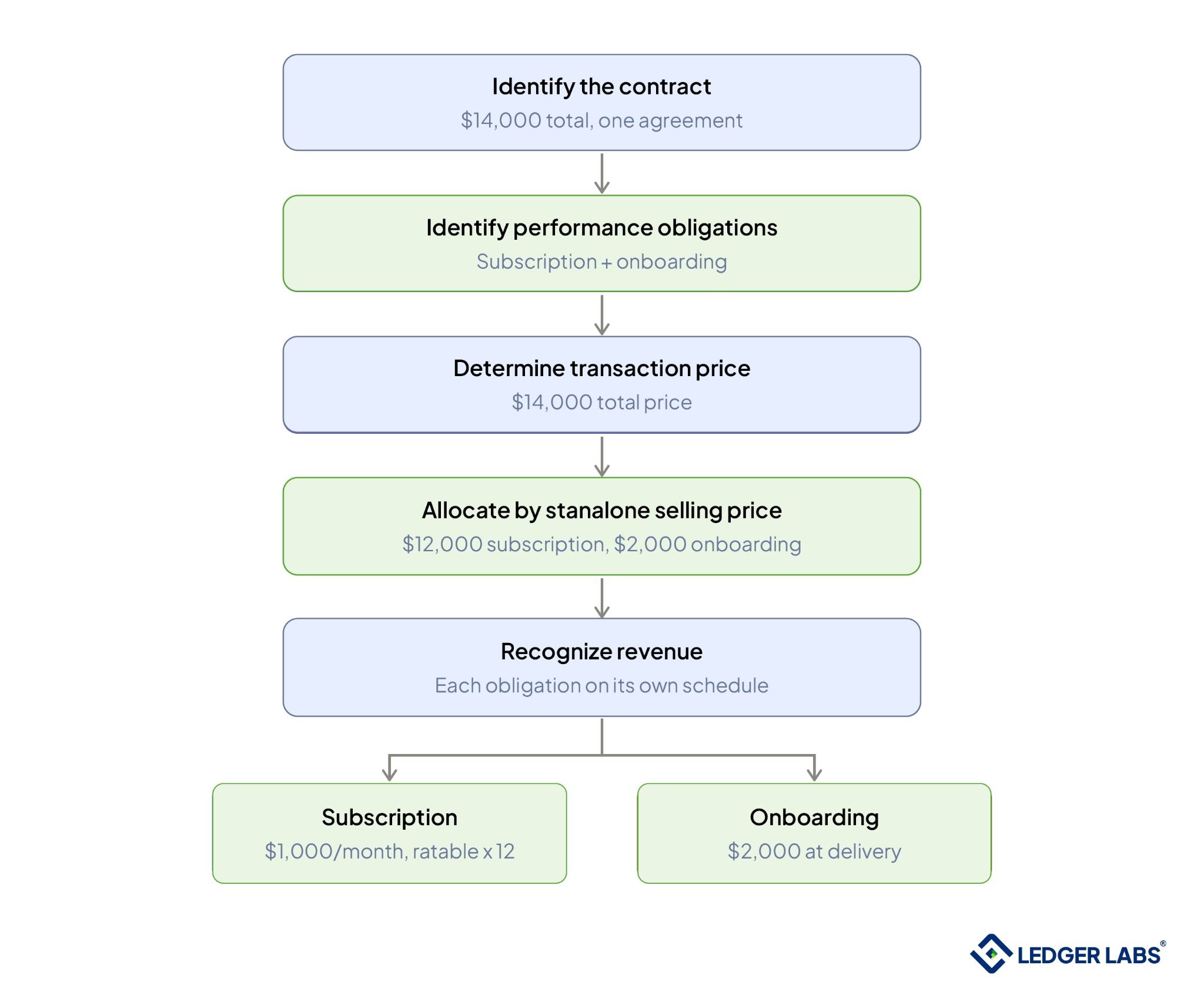
NetSuite’s Advanced Revenue Management (ARM) module handles ASC 606. It creates a revenue arrangement for each contract and identifies the performance obligations inside it. ARM then allocates the total price across those obligations by their standalone selling prices and recognizes revenue on a set schedule, usually evenly over time, regardless of when you bill. That separation of billing from revenue is the whole point.
ARM runs the mechanics; the five-step model is where the judgment lives. Start with a bundle. For example, if you sell a $12,000 annual plan with a $2,000 onboarding package, you have one contract with two components: the subscription (delivered over 12 months) and the onboarding (delivered once, up front).
ARM divides the $14,000 between the two based on each part’s standalone value, recognizes the onboarding income when you deliver it, and spreads the subscription income evenly over the year. If you book it as a single amount, you’d recognize it all wrong.
Deferred Revenue and Contract Liabilities in NetSuite
Deferred revenue is cash received but not yet earned. In NetSuite, it appears as a liability, which decreases as you provide services. When managed correctly, your deferred revenue balance matches the unearned portion of all active contracts and reconciles perfectly at period-end.
The main mistake many SaaS businesses make is not tracking deferred revenue properly.
The roll-forward process is essential: start with your opening balance, add any new amounts billed, and subtract revenue recognized during the period to get the closing balance. If this doesn’t match your revenue recognition schedule, something is wrong, and auditors will notice. NetSuite generates the schedule, while the roll-forward ensures its accuracy.
Two common issues can complicate this:
First, confusion often arises between current and long-term liabilities. For example, if a customer prepays $36,000 for three years, only $12,000 goes into current liabilities; the remaining $24,000 should be classified as long-term. Misclassifying can overstate current liabilities and distort working capital, making it easier for auditors to identify and correct.
Second, timing can be tricky. If you deliver services before billing, commonly seen in annual contracts billed quarterly, you may have unbilled receivables, or contract assets, that are often overlooked. This represents revenue earned but not invoiced, and ignoring it undervalues the business.
Subscription Billing Reconciled to the NetSuite GL
NetSuite tracks subscription billing by matching charges from your billing platform, like Stripe, Chargebee, or Recurly, with invoices, payments, and revenue in NetSuite. This keeps your billing, cash, and revenue aligned and helps prevent lost revenue that can undervalue your SaaS earnings.
Your billing platform shows what you charge customers, while NetSuite handles financial records. Reconciling these two systems each month connects them and can be challenging for three reasons.
- Proration comes first: when a customer upgrades mid-cycle, the platform issues a partial charge, and that amount has to land in the right revenue and deferred-revenue accounts, not a catch-all.
- Dunning comes second: failed payments, retries, and recoveries push cash across periods, and every state has to reconcile instead of disappearing.
- Refunds and credits come third: reversing revenue you may have already recognized.
Here’s the tell that it’s broken: a Stripe payout booked as a single deposit. When a $48,000 payout hits the bank as one lump sum, the revenue, the processor fees, and the refunds inside it vanish into one number, and those fees understate your revenue every single month.
A quieter leak hides in trials and discounts. A three-month promo rate the ledger treats as full price inflates MRR and misstates deferred revenue at once.
Automation gets you most of the way; someone still has to own the exceptions each close. When what you billed, collected, and recognized all agree, your metrics finally hold up, which is the next problem.
SaaS Metrics From the NetSuite General Ledger
NetSuite provides key metrics investors care about, including Monthly Recurring Revenue (MRR), Annual Recurring Revenue (ARR), net revenue retention, churn, Customer Acquisition Cost (CAC), and Customer Lifetime Value (LTV). These figures come straight from the general ledger, ensuring they match your financial statements instead of being stuck in separate spreadsheets. Metrics linked to the general ledger are trustworthy during reviews, while those that are not can be problematic.
NetSuite uses saved searches and datasets based on recognized revenue and customer records. Active subscriptions create MRR, and you calculate ARR by multiplying MRR by twelve. To find net revenue retention, take expansion revenue, subtract contraction revenue, and then subtract churn, all from the same ledger used for financial reports.
During reviews, teams usually focus on net revenue retention first, as it can be easily miscalculated. For example, if a group starts the year with $100,000 in MRR and ends with $108,000 after a $22,000 increase, a $6,000 decrease, and $8,000 churn, the NRR is 108%. Every number must come from actual revenue, not estimates.
Spreadsheets can become unreliable because they only update when someone remembers. In contrast, the ledger updates every time revenue is recognized. Over time, these figures may no longer match, leading to issues in your board presentations.
When NRR comes from the general ledger, you can back it up with detailed data. If it relies on a spreadsheet that doesn’t match the ledger, you can’t defend it, causing problems during review calls.
More entities and currencies make it harder to keep metrics aligned with the ledger, which is why consolidation is crucial.
Multi-Entity and Multi-Currency Consolidation for Global SaaS
NetSuite OneWorld helps global SaaS companies manage their subsidiaries by allowing each one to operate in its own currency and keep its own financial records. The system automatically combines this information for the parent company while eliminating intercompany transactions and handling currency conversion. This means each subsidiary can close its books locally and the parent can report as one company under US GAAP.
Each subsidiary uses a base currency for daily operations and reports financials in the parent’s currency. The translation process follows standard rules: you use the average exchange rate for the income statement and the period-end rate for the balance sheet. Any differences are recorded as a cumulative translation adjustment in equity, which does not affect your profit and loss statement.
Now, regarding intercompany transactions: if the US parent charges its UK subsidiary $200,000 for shared engineering services, the parent records $200,000 in revenue, and the UK subsidiary records $200,000 in expense. Both entries are correct on their own, but during consolidation, you must eliminate them to avoid inflating group revenue by $200,000 that was not earned from an outside customer.
Uneliminated intercompany revenue is a common consolidation mistake, and it can mislead investors because total revenue will appear higher than what comes from actual customer contracts.
NetSuite automates the elimination process once you set up the intercompany relationships properly. This setup includes mapping accounts, defining pairs, and configuring elimination rules, which requires accounting knowledge, not just administrative access.
The result is consolidated financial statements that account for currency translation and eliminate intercompany transactions. This allows a global SaaS company to close its finances as one entity, and this consolidated close is the final step before reporting.
Month-End Close and Investor-Ready Reporting
A month-end close for a SaaS business in NetSuite combines revenue recognition, deferred revenue, billing, and consolidation into financial statements for the board, lenders, or diligence teams. With the right setup, it can be completed in days, not weeks. Being investor-ready means every number is traceable: recognized revenue connects to the ARM schedule, deferred revenue matches the roll-forward, and metrics relate to the general ledger (GL).
Treat the close as a checklist with key steps:
- Run and review recognition: ensure the ARM booked the month’s revenue based on actual contracts.
- Reconcile deferred revenue to the roll-forward: identify gaps between earned and collected revenue.
- Tie billing to cash: detect processor fees or failed payments that can cause revenue loss. Eliminate intercompany transactions to avoid double-counting group revenue.
- Reconcile bank statements and conduct a flux review: flag unusual changes that need explanation.
The diligence team starts by requesting the deferred revenue schedule and the revenue recognition policy. These documents highlight where to focus your efforts.
Clear and consistent documents make the diligence process easier, while unclear ones lead to more complicated questions.
This approach speeds up the process. A typical close takes three to four weeks due to manual revenue schedule reconstruction. With an effective ARM setup, it can be done in days, simplifying fundraising and audits.
The key question is who will manage this process.
In-House vs. Outsourced NetSuite Accounting for SaaS
You have three options for running NetSuite accounting for a SaaS business: hire an in-house accountant, use a general NetSuite bookkeeper, or hire an outsourced team led by a CPA or EA.
Choose based on whether you need detailed revenue recognition (ASC 606) or just basic transaction processing. For SaaS companies with $1 million to $20 million in revenue, an outsourced CPA/EA team offers expertise without the cost of a senior hire.
| Factors | In-House Hire | Generalist NetSuite Bookkeeper | CPA/EA-Led Outsourced |
|---|---|---|---|
| ASC 606 Judgment | Yes, if senior | Rarely | Yes |
| SaaS Metrics Tied to GL | Depends | No | Yes |
| Diligence-Ready Books | Depends | No | Yes |
| Cost | Highest | Lowest | Middle |
| Scales With You | Slowly | No | Yes |
A generalist bookkeeper keeps your financial records up to date, but a specialized CPA/EA team ensures accurate revenue recognition. This difference matters during raises or audits.
We manage revenue recognition in your NetSuite account, reconcile your billing platform with your financial records, generate SaaS metrics that match your finances, and deliver a monthly close ready for investors. You can stop worrying about your books and save time that you used to spend fixing them.
If your NetSuite SaaS records have gaps, a free review will help you find them and show you how to set up your books properly for your business’s stage.
The Bottom Line
NetSuite can handle SaaS accounting effectively for audits and reviews, but you need to set up ASC 606 recognition, reconcile deferred revenue, link billing to the ledger, and pull metrics from the general ledger. Regular reviews at the end of each reporting period are also essential. While the software is capable, it requires good judgment to use it properly.
If you rely on a generalist approach, problems can remain hidden until critical moments like audits or funding requests. At these times, accurate financial records are crucial and difficult to produce quickly. It’s usually cheaper to manage finances correctly from the start than to fix issues later.
To understand the current status of your NetSuite SaaS accounting, schedule a free consultation call to identify gaps and see what a well-organized setup looks like for your business.
FAQs
1. What do NetSuite accounting services for SaaS companies include?
They cover revenue recognition under ASC 606, deferred revenue management, subscription billing reconciliation, SaaS metrics reporting, multi-entity consolidation, and monthly financial statements for investors, all within your NetSuite system. The specific services depend on your business stage and setup, which a book review will outline.
2. Do you work inside our existing NetSuite instance?
Yes, we work directly in your NetSuite account rather than moving you to another system, configuring or correcting revenue recognition, billing, and close processes in the environment you already run. If you’re mid-implementation, we coordinate around it. A short access review confirms what’s already in place before anything changes.
3. How does NetSuite handle ASC 606 revenue recognition for subscriptions?
NetSuite’s Advanced Revenue Management module creates a revenue arrangement for each contract, identifies the performance obligations, allocates the price by standalone selling price, and recognizes revenue on a schedule independent of billing, usually ratably over the subscription term. The software produces the schedule; a reviewer confirms it matches the contract, especially on bundles, upgrades, and modifications. That review is where we spend our time.
4. Can you set up or clean up deferred revenue schedules in NetSuite?
Yes. We build or correct the deferral schedules behind your recognition, reconcile the deferred revenue roll-forward to the penny, and split balances between current and long-term for multi-year deals. If your deferred balance has drifted from your active contracts, cleanup starts with rebuilding that roll-forward. A review shows how far off it currently is.
5. Do you reconcile our billing platform to NetSuite?
Yes, Stripe, Chargebee, Recurly, and similar platforms. We map each charge, payout, fee, and refund to the general ledger so billings, cash, and recognized revenue agree every month, closing the revenue leakage that lump-sum payout entries create. Which integrations you have decides how automated this can be, and a review flags the gaps.
6. What SaaS metrics can you report from NetSuite?
MRR, ARR, net revenue retention, gross and net churn, CAC, and LTV, sourced from the general ledger so they reconcile to your financial statements rather than a standalone spreadsheet. That reconciliation is what makes them defensible in diligence. We can align the definitions to what your board and investors already use.
7. How is this different from a general NetSuite bookkeeper?
A generalist bookkeeper records transactions; a CPA/EA-led SaaS team makes the accounting judgments SaaS requires: ASC 606 allocation, deferred revenue treatment, contract assets, consolidation eliminations. The difference doesn’t show in a normal month; it shows the moment your books face an auditor or investor. A review is the cheapest way to see which one you currently have.
8. How much do outsourced NetSuite accounting services for SaaS cost?
Pricing depends on transaction volume, entity count, and revenue complexity, not a flat rate. Running a single-entity Series A company costs less than managing a multi-entity global company. A books review provides specific details and pricing for your setup, not a general estimate.