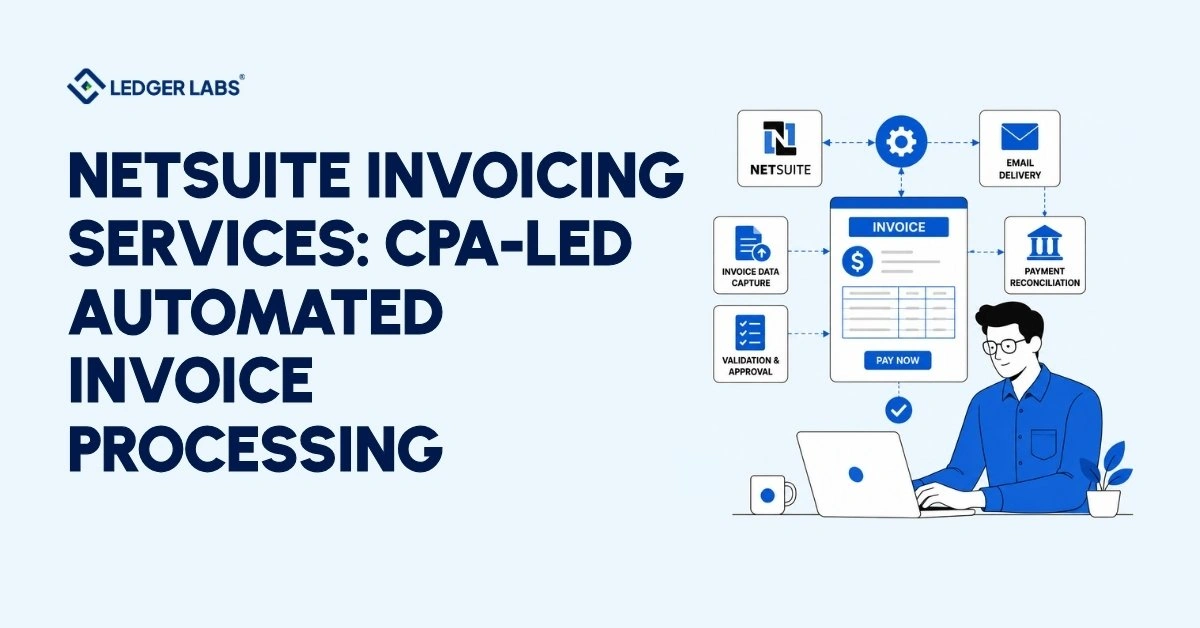
To automate NetSuite invoicing, you need three things configured and working together: invoice capture, approval routing, and three-way matching. Most finance teams running NetSuite have configured one of them. The other two still live in an inbox and a spreadsheet.
That’s the real state of invoicing at most businesses your size. Someone on your team opens a PDF on one screen and types it into NetSuite on the other, 400 times this month. Approvals sit unread until someone chases them. Duplicate invoices slip through because nobody has detection enabled. And your close slips from three days to twelve, so the AR aging report you need for a cash decision arrives after the decision window has shut.
NetSuite handles most of this already. It reads invoice data using OCR, assigns it to the correct GL account, routes approvals without needing emails, matches every invoice to its purchase order (PO) and receipt, and reconciles payments daily. You paid for these features when you bought the ERP, but you’re only using about a third of it. This isn’t because the software can’t do more; it’s because the necessary configuration choices were never made.
Make the right decisions, and you can stop paying someone full-time to retype data that your system can already read. Make the wrong choices, and you will automate a flawed process, which will bring incorrect numbers into your records faster than a human could.
Start with what that manual work is actually costing you.
Key Takeaways
- Automated NetSuite invoicing requires three configured components: invoice capture, approval routing, and three-way PO matching.
- Manual invoice entry takes roughly 11 minutes per invoice, at a full headcount of 400 invoices monthly.
- Most NetSuite users configure only a fraction of the available automation, then blame the software for the manual work.
- Automation without control review moves bad data faster; duplicate payments and coding errors scale with it.
- Ledger Labs’ CPAs configure your invoicing workflow, review every control, and reconcile the output monthly.
Why Is Your Team Still Manually Inputting Invoices Into NetSuite?
Many teams enter invoices manually into NetSuite due to four common reasons: invoice capture isn’t enabled, GL coding rules aren’t set up, approval workflows aren’t configured, or the AP process was migrated unchanged from the old system.
NetSuite includes all these features by default. Activating them is a matter of configuration, not licensing, which often leads teams to continue their previous manual workflows even after implementing NetSuite.
Here’s what that looks like on a Tuesday:
Your AP clerk has 40 invoices sitting in a shared inbox. She opens the first PDF, opens a blank bill record, keys the header, keys each line, guesses at the GL code for a vendor she hasn’t seen before, saves, and opens the next one. Somewhere around invoice 25, she stops double-checking her totals.
That’s not a discipline problem. That’s what happens to anyone repeating the same task 400 times a month.
The errors that arise are consistent, with the same four appearing in nearly every NetSuite AP review we conduct:
- Transposed amounts that survive because nobody re-reads their own typing
- Duplicate bills entered twice under slightly different vendor spellings
- GL miscoding that quietly distorts your departmental P&L
- Invoices never entered at all, surfacing weeks later as an angry vendor call
Each item is recovered individually. Together, they show what your team entered, not what your vendors actually billed. You’ll only notice this discrepancy during the close.
The close is when everything is finalized. Every mistake becomes a reconciliation issue, every issue raises a question, and every question delays the process. Teams entering invoices by hand usually take over ten days to close. They’re not slow; they are reviewing their own data entry.
Sound familiar? Here’s what it’s costing you every month.
What Does Manual Invoicing Actually Cost You Every Month?
Manual invoicing costs you in four places: labor hours on data entry, duplicate and overpaid invoices, missed early-payment discounts, and the extra days your close takes while your team reconciles its own typing. Most owners only count the first one. The other three are usually larger.
To calculate your costs, take your monthly invoice total and multiply it by the minutes spent handling each invoice from start to finish, including receipt, data entry, coding, approval, and filing. Then, divide that number by 60.
| Your Inputs | Example |
|---|---|
| Invoices per month | 400 |
| Minutes handled per invoice | 11 |
| Hours per month | 73 |
| Fully loaded AP cost per hour | $35 |
| Annual labor cost | ~$30,700 |
That’s one number, and it’s the smallest one on this page.
The costs nobody puts in the spreadsheet are the ones that actually move your P&L:
- Duplicate payments you never claw back, because nobody configured detection
- Early-payment discounts forfeited while invoices sit unapproved in an inbox
- GL miscoding that misstates department margins and misleads your next hiring decision
- A close that runs twelve days instead of three, delaying every cash decision downstream
We reviewed a NetSuite accounts payable process last year for a client who only budgeted for the clerk’s time. Duplicate payments surpassed the clerk’s salary.
The troubling part is that these issues don’t show up as clear line items. Instead, they appear as slow closes, thin margins, and vendors calling multiple times. You pay monthly, but you never see the invoice.
So what does it look like when NetSuite handles this properly?
What Does Automated NetSuite Invoicing Look Like Once It's Running?
Automated NetSuite invoicing allows invoices to be received, read, coded, approved, and matched to purchase orders without manual data entry. Your team will focus on reviewing unusual cases only the invoices that don’t match, don’t reconcile, or aren’t relevant.
This is the change: it’s not just about faster data entry, but eliminating data entry altogether.
You Stop Keying Invoice Data Entirely
Invoice capture reads the vendor PDF and builds the bill record for you. NetSuite’s OCR pulls the vendor, date, amounts, and line items, then presents the scanned image alongside the extracted fields so your clerk verifies rather than transcribes. Vendors email invoices to a dedicated address, and they land in NetSuite as drafts.
Your clerk’s job changes from typing 400 invoices to checking the ones the system flags.
You Stop Chasing Approvers
Approval routing sends each invoice to the right person based on rules you set once. Amount thresholds, department, vendor, project the rules decide, not your AP clerk’s memory. Approvers get reminders automatically. Nothing sits in an inbox because someone forgot.
You Stop Overpaying Vendors
Three-way matching checks the invoice against the purchase order and the goods receipt before making a payment. If all three documents match, the invoice moves forward automatically. If they don’t match, the issue goes to a specific person to handle. Duplicate detection finds any invoice entered twice, even if the vendor name is spelled differently.
Invoice automation for NetSuite is not just one feature you can turn on. It relies on these three parts working together, and each part depends on choices made during setup.
Which raises the obvious question: how does the process actually flow, end to end?
How Does NetSuite Invoice Processing Work, Start to Finish?
NetSuite invoice processing works in five steps: the invoice arrives and is captured, the system assigns it to a GL account, it goes to the right person for approval, three-way matching checks it against the purchase order and receipt, and finally, payment is posted and reconciled. When set up correctly, a simple invoice goes through all five steps without any human interaction.
Here’s how each stage works:
Stage 1: The invoice arrives, and NetSuite reads it
Your vendor emails the PDF to a dedicated capture address. OCR extracts the header and line items, then builds a draft bill record with the scanned image alongside it.
Stage 2: NetSuite codes it
Coding rules assign the GL account based on vendor, item, or department. New vendors with no rule get flagged, not guessed at.
Stage 3: Approval routes itself
Thresholds you set once decide who approves what. A $400 office supply invoice and a $40,000 equipment bill take different paths, and neither waits on someone’s memory.
Stage 4: Matching verifies the numbers
Three-way matching compares invoice, purchase order, and goods receipt. Agreement advances the invoice. Disagreement routes it to a named person with a specific discrepancy.
Stage 5: Payment posts and reconciles
Payments are applied to approved bills, and daily bank reconciliation matches what left your account with what your ledger shows.
People frequently ask how to manually create an invoice in NetSuite. To do this, go to Transactions → Sales → Create Invoice.
This option works for occasional invoices, but for higher volumes, it’s more efficient to use the automated process outlined in the five stages above.
So why do so many of these builds still fail?
Where Does NetSuite Invoicing Break Down Before Go-Live?
NetSuite invoicing has four main issues: low OCR accuracy for your volume needs, approval rules without an escalation process, incorrect matching tolerances, and a chart of accounts that hasn’t been updated for automated coding. Each of these issues passes in a demo, but they will cause problems by the second month.
Automation does not fix a broken process; it just makes it faster.
OCR accuracy is the first thing we test
A system that reads 82% of invoices correctly sounds good, but let’s break it down. With 400 invoices a month, 72 will have issues a clerk must fix. Accuracy varies by invoice type; clean PDFs are easier to read, whereas handwritten notes can lead to errors. Always test the system with your actual invoices instead of just a sample.
Approval rules fail on non-response, not rejection
Most builds route an invoice to an approver and stop. No escalation, no timeout, no reassignment when that person is on leave. The invoice sits in a queue nobody monitors until the close.
Matching tolerances are where money leaks
Too tight, and every freight variance becomes an exception your team hand-clears; you’ve automated nothing. Too loose, and NetSuite silently approves a 6% overcharge. The right tolerance depends on your vendor terms and margin structure.
That is an accounting decision, not a software setting.
The chart of accounts is the one nobody checks
Your coding rules depend on your current General Ledger (GL) structure. If this structure aligns with your founders’ views rather than with actual transactions, automation will cause consistent errors in your reports.
Automation is useful, but it’s important to check your controls first. You need someone responsible for the numbers after the system goes live, and that’s what an accounting team provides.
How Does Ledger Labs Run Your NetSuite Invoicing?
We manage your NetSuite invoice process. Before you go live, we review your controls, set up invoice capture, coding, approvals, and vendor matching. We handle exceptions and monthly reconciliations. You won’t need to enter invoices; we handle everything for the ledger.
Ledger Labs is an accounting firm led by qualified accountants. We don’t sell software; we configure NetSuite and do the accounting for you. Invoicing is one part of our broader NetSuite accounting services, which cover the full close, not just the AP queue.
- We start with a four-point control review. First, we check the accuracy of our OCR technology with your live invoices. Then, we outline your approval thresholds by department and amount. Next, we set matching tolerances based on your vendor terms and verify if your chart of accounts can handle automated coding. We fix any issues before going live.
- Then we take the ongoing work. Your team stops keying invoices and stops chasing approvers. We handle the exception queue, review the coding, reconcile payments against the bank daily, and close your books on a fixed calendar. When a duplicate surfaces or a match fails, a CPA looks at it, not a support ticket.
- And we stay on the numbers. You get a close you can trust, an AR aging that arrives in time to act on, and a P&L where department margins mean what they say.
That’s the difference between buying invoice automation and hiring the people responsible for the outcome.
Start with a free NetSuite invoicing review; we’ll tell you exactly what’s configured, what isn’t, and what it’s costing you.
Conclusion
Take the figure you calculated earlier and multiply it by twelve. That’s your annual cost of entering invoices by hand.
It doesn’t appear on any statement. It shows up as a twelve-day close, a duplicate payment nobody catches, and a department margin that isn’t what your P&L says.
NetSuite already includes the fix. Capture, coding rules, approval routing, three-way matching- you bought all of it. The gap is configuration, and the risk is automating a process nobody reviewed first.
We test the controls, configure the build against your actual vendors, then own the exception queue and the close.
Book a free NetSuite invoicing review. We’ll tell you what’s configured, what isn’t, and what it’s costing you.
FAQs
1. How much does NetSuite invoice automation cost to set up?
Cost depends on your invoice volume, whether your license already includes the capture module, and how much your chart of accounts needs rebuilding before automated coding works. A broken GL structure adds real time.
2. Does NetSuite include invoice automation, or do you need an add-on?
Yes, NetSuite includes it in the standard platform. The invoice automation NetSuite provides covers OCR capture, GL coding rules, approval routing, and three-way matching. What it doesn’t include is configuration. Our review tells you which components your license covers and what’s actually switched on.
3. Can NetSuite handle high-volume invoices?
Yes, NetSuite processes thousands of invoices each month without additional software. The constraint isn’t volume, it’s exception rate. If capture reads 82% correctly, higher volume just means more exceptions on the same clerk. Our review tests accuracy against your live vendor mix before go-live.
4. How long does a NetSuite invoicing implementation take?
Weeks, not months, but your chart of accounts decides. A clean GL structure moves fast. One is built around the idea that founders think the business needs rebuilding first, and that’s where projects stall.
5. What happens to invoices that don't match the purchase order?
They route to a named person with a specific discrepancy to resolve. Matching tolerance determines what counts as a mismatch; too tight creates manual work; too loose silently approves overcharges. That’s an accounting decision. We set it and own the exception queue.
6. Can you still create an invoice manually in NetSuite?
Yes, Transactions → Sales → Create Invoice. The path stays available for one-offs. But if manual entry is your primary workflow at volume, you’re doing by hand what capture and routing do alone. Our review shows how many invoices actually need a human.
7. What's the difference between NetSuite invoicing and NetSuite billing?
Invoicing covers the individual transaction, creating, approving, and reconciling a single invoice. Billing covers the revenue model behind it: subscriptions, recurring charges, usage pricing. Both need configuring, and they fail differently. Our review flags any billing setup issues that may be causing invoicing problems.