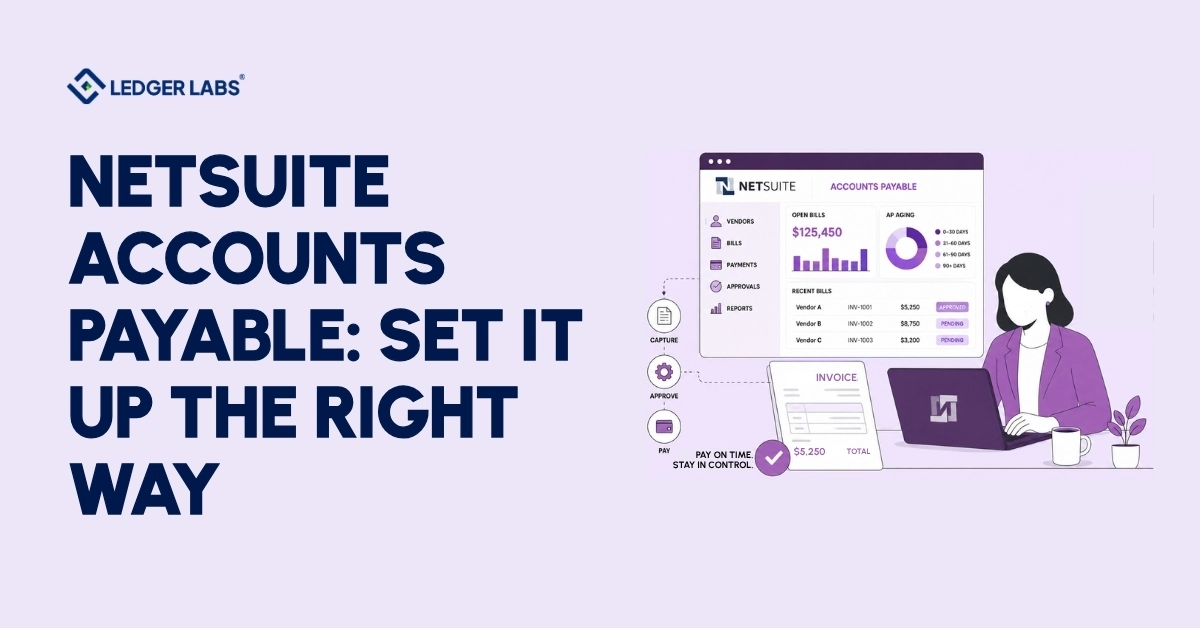
To set up NetSuite Accounts Payable effectively, you need to configure its features, controls, and matching rules to match your business’s purchasing process. This helps ensure invoices move accurately from capture to payment, prevents fraud, and keeps your financial records ready for audits. NetSuite provides the Accounts Payable system, but how you set it up determines whether it streamlines your work or creates extra challenges.
Here’s why this is important: You implemented NetSuite to manage your finances better, but if your Accounts Payable still relies on forwarded PDFs and lengthy email approval chains, you might risk paying the same invoice twice.
This poor setup leads to the same problems you faced with QuickBooks, only now it can cost more to fix. Configure it correctly, using appropriate controls and matching rules that align with your purchasing, and Accounts Payable can become a smooth process that doesn’t require constant attention.
This guide is intended for controllers, AP managers, and hands-on CFOs at companies earning $2M–$50M.
It will explain what NetSuite Accounts Payable does and doesn’t do, how the process works, how to set it up for audits, the costs involved, and when it might be better to hire an accounting team.
Key Takeaways
- NetSuite gives you a powerful AP engine, but the correct setup decides whether it actually works.
- NetSuite AP can’t move money natively; ACH, checks, and wires need a connected payment tool.
- 3-way matching prevents you from paying for goods you ordered but never actually received.
- Strong controls, segregation of duties, approval thresholds, duplicate detection — make NetSuite AP genuinely fraud-resistant.
- Native AP is included in your NetSuite license; third-party tools add monthly subscription cost.
- A NetSuite team configures the controls and can run your AP fully audit-ready.
What is NetSuite Accounts Payable?
NetSuite Accounts Payable is a part of NetSuite’s cloud ERP that helps your business manage money owed to vendors. It captures bills, matches them with purchase orders, routes them for approval, records payments, and reconciles them with your general ledger.
Since it operates within the same system as your general ledger, every payable updates your financial information in real time.
What that gets you: protected cash flow (you see exactly what’s due and when), clean books (payables tie straight to the GL with a full audit trail), and on-time vendor payments without chasing approvals.
One important point to keep in mind: NetSuite provides the tools, but you need to set it up correctly for your accounts payable (AP) process to work well.
What can NetSuite Accounts Payable do, and what are its limitations?
NetSuite AP handles the full record-keeping cycle, vendor records, purchase orders, bill capture with OCR, approval workflows, payment recording, and AP reporting.
NetSuite AP has a key limitation: it cannot handle money transfers on its own. You need to connect a bank account or use a third-party tool to make ACH, check, or wire payments. This limitation is often misunderstood and is a major factor in deciding whether to add extra features.
What NetSuite AP does natively:
- Vendor records – one profile per supplier, with payment terms, tax IDs, and full history
- Purchase orders – create, approve, and receive POs that flow into matching
- Bill Capture (OCR) – reads invoices and pre-fills the vendor bill, cutting manual entry
- Approval workflows – route bills by amount, vendor, or department on rules you set
- Payment recording & reconciliation – log payments and reconcile to the GL
- AP reporting – aging, vendor spend, and duplicate-bill flags, audit-ready
What it doesn’t do natively:
- Execute payments – NetSuite records that a vendor was paid; it doesn’t disburse the funds. You connect a bank or a platform like Tipalti, Ramp, Bill, or AvidXchange to actually send money.
- Touchless, high-volume processing – Native OCR and matching are solid, but true line-level, near-zero-touch AP usually needs an add-on.
- Global / multi-currency payments at scale – International disbursement is where third-party tools earn their keep.
Here’s why this is important for you: If your NetSuite accounts payable is “set up” but still feels manual, it’s usually because of a missing payment connection or an incomplete configuration. A NetSuite team can fix this gap, often without you needing to buy any new tools.
How does NetSuite Accounts Payable work, step by step?
NetSuite Accounts Payable process follows a five-stage flow: capture the invoice, match it to a purchase order, route it for approval, record the payment, and reconcile it against the general ledger.
Each stage can be automated, and the quality of your setup determines how much human touch each one still needs.
Follow the process of how a bill moves through the system:
Step 1: Capture
A vendor invoice arrives. Bill Capture’s OCR reads it and creates a draft vendor bill, pulling the vendor, amount, and line items, so your team isn’t keying data by hand.
Step 2: Match
NetSuite checks bills against your records before making any payments. It compares the bill to the purchase order (2-way matching) and also to the item receipt (3-way matching). This process helps catch overpayments, price differences, and duplicate invoices before money is paid out.
Step 3: Approve
The bill is routed to the appropriate approver based on the rules you set, such as dollar amount, department, or vendor. Approvers can sign off from anywhere.
Step 4: Pay
Once your payment is approved, it will be scheduled and recorded. Remember, the actual money will move through your connected bank or payment tool.
Step 5: Reconcile
The payment posts to the GL and reconciles against your bank records, keeping your books accurate and audit-ready.
When this flow is configured well, a routine invoice can move from the inbox to paid with almost no manual intervention. When it’s configured loosely, every one of those five stages becomes a place for errors to creep in.
What is the difference between 2-way and 3-way matching in NetSuite?
2-way matching verifies the bill against the purchase order; 3-way matching adds the item receipt. The simple rule: use 2-way for services you can’t “receive,” and 3-way for any physical goods.
| Methods | Documents Matched | Best For |
|---|---|---|
| 2-way | Bill ↔ PO | Services, subscriptions, utilities, anything with no physical delivery |
| 3-way | Bill ↔ PO ↔ Item Receipt | Inventory, equipment, raw materials, anything you physically receive |
For businesses that sell products or hold inventory, 3-way matching is the control that stops you from paying for goods that never arrived. NetSuite handles both natively; the one thing that can make or break it is how you set your matching tolerances, which we cover in the setup steps below.
How do you set up Accounts Payable in NetSuite the right way?
To set up NetSuite AP, follow these five steps in order: (1) enable the necessary features, (2) clean up your vendor records, (3) create approval workflows, (4) set matching tolerances, and (5) link a payment method.
Once the process is complete, test the process end-to-end before relying on it. Follow the steps in order; skipping them can cause issues.
Step 1: Enable the right features
Go to the Setup section and activate A/P, purchase orders, and advanced receiving. The default settings usually do not reflect how your business handles purchases, so this is a conscious choice, not just a simple checkbox.
Step 2: Clean your vendor records first
Make sure to have accurate payment terms, tax IDs, and banking details before you start automating. Incorrect vendor data is the top reason why NetSuite AP automation fails to meet expectations. Clean up the data before you go live, not afterward.
Step 3: Build approval routing that reflects reality
Don’t send everything to the CFO. Set small-dollar limits and department rules so that straightforward invoices process automatically and only exceptions require human review.
Step 4: Set matching tolerances thoughtfully
Tolerances help ensure that matching works effectively. If they are too strict, your team will struggle with too many exceptions. If they are too loose, overpayments may go unnoticed. Finding the right balance is important, and it’s one of the first things we adjust during a NetSuite AP cleanup.
Step 5: Connect your payment method and test
Wire up your bank or payment platform, then run a small batch of real invoices end-to-end before you flip the switch for everyone.
The biggest mistake is having an implementer set up accounts payable (AP) who knows the software but lacks accounting knowledge. The features may work, and the workflows may function, but the controls and limits could be incorrect. You only discover this issue at month-end or during an audit. Getting AP set up correctly from the start is much cheaper than fixing problems later.
How do you prevent fraud and strengthen controls in NetSuite AP?
You improve accounts payable (AP) controls in NetSuite by separating duties, setting approval levels, enabling duplicate payment detection, maintaining an audit trail, and regularly reconciling vendor statements.
AP is the most common area targeted for financial fraud because it involves outgoing money, so these measures are essential. For a CPA, this is crucial for ensuring accurate financial reporting.
Payment fraud and invoice fraud hit a large share of finance teams every year, and the losses are rarely small.
The good news: NetSuite gives you the tools to make AP genuinely hard to defraud, if you configure them.
The controls that matter most:
- Segregation of duties: The person who enters a bill should not also approve the payment. NetSuite’s role-based permissions ensure that no single user can process a payment from start to finish.
- Approval thresholds: Set dollar limits that force a second set of eyes on large or unusual payments before they go out.
- Duplicate detection: Configure NetSuite to flag invoices that match an existing number, date, and amount, the most common way companies pay the same bill twice.
- A complete audit trail: Every action on a bill is logged, which is exactly what an auditor (or a fraud investigation) needs.
- Vendor statement reconciliation: Reconcile statements against NetSuite records on a schedule, prioritizing high-volume vendors, to catch missing or manipulated invoices early.
Most AP fraud is not caught by software but by controls that someone has set up. An accounting team adds value to your NetSuite AP by creating these controls to protect your business and ensure a smooth audit.
How do you prevent fraud and strengthen controls in NetSuite AP?
NetSuite AP automation costs fall into two layers. NetSuite’s native AP features are included in your ERP license at no separate charge; third-party AP tools add roughly a few hundred to a few thousand dollars a month, depending on invoice volume, payment types, and number of entities.
AP automation itself, the software that captures invoices, matches them, routes approvals, and records payments so your team only handles the exceptions, is something we break down in full in our guide to NetSuite AP automation.
The main budgeting question isn’t “what does native AP cost?” It’s about whether you need an extra tool for higher-volume or global payments, and which implementation suits you best.
What actually drives your cost:
- NetSuite licensing: AP functionality is included in your existing NetSuite subscription, so there’s no separate “AP module” invoice. The variables are users and add-on SuiteApps.
- Third-party tool pricing: usually subscription-based, scaled to invoice volume, entities, and whether you need global payments. Most vendors quote custom pricing, not list prices.
- Implementation & configuration: the one-time cost of setting AP up correctly: workflows, tolerances, controls, integrations, and testing.
- The hidden cost of getting it wrong: duplicate payments, late fees, missed early-payment discounts, and cleanup hours. Nobody puts this in a quote, and it’s usually the biggest line of all.
What matters most for NetSuite AP at a $2M–$50M company?
For companies earning $2M–$50M, accounts payable (AP) needs differ from those of larger businesses. Focus on clear controls, accurate records, and efficiency, without overspending on software or unnecessary customizations.
Companies often struggle with being too relaxed or over-complicating AP, leading to errors and unnecessary costs. The goal is to find the right balance.
What we communicate to companies in this category:
- Controls before automation: Get segregation of duties, approval thresholds, and 3-way matching right first. Automating a broken process just makes the mess faster.
- Don’t over-customize NetSuite: Its preconfigured best practices cover most of what a mid-market company needs. Heavy customization drives cost and maintenance you’ll regret.
- Match the tool to the volume: If you’re processing a few hundred invoices a month domestically, a well-configured native AP beats a pricey add-on.
- Protect the close: AP feeds month-end. A clean, controlled AP process is what lets you close in days instead of weeks.
This right-sizing judgment is exactly where a NetSuite-fluent team earns its keep, because we’ve made these calls for companies that look like yours, not for the Fortune 500.
Should you manage NetSuite AP in-house or outsource it to an accounting team?
Manage your Accounts Payable (AP) in-house if your team has the capacity, knowledge, and controls to do it effectively. If AP is too time-consuming, controls are weak, records aren’t audit-ready, or you’d rather have expert hands on it, it’s time to outsource accounts payable on NetSuite to an accounting team.
For companies earning $2M–$50M, a hybrid approach in which your team collaborates with a CPA for setup and oversight is often the best solution.
Be honest about where you are. If any of these sound familiar, outsourcing usually wins:
- AP is consuming hours your team should spend on higher-value work.
- You’re not fully confident that your controls would survive an audit.
- You’ve had a duplicate payment, a missed discount, or a late-fee surprise.
- Your NetSuite AP was set up by an implementer who knew the software but not accounting.
- Month-end drags because payables aren’t clean.
Conclusion
NetSuite offers one of the best accounts payable (AP) systems available. However, the real challenge lies not in the system itself, but in how you set it up and manage it. Getting the setup, controls, and decisions about tolerances and matching right is what allows your AP process to run smoothly instead of becoming a hassle for your team.
When you get these elements correct, AP delivers the results you want from NetSuite: accurate financial records, secure cash flow, and month-end closings that take days instead of weeks. If you get it wrong, you risk duplicate payments, missed discounts, and audit problems you might not recognize until it’s too late.
An accounting team that knows NetSuite can help bridge this gap. We don’t just activate features; we set up controls to ensure your AP process is safe, organized, and audit-ready. We can also handle the entire function, so your team can focus on other tasks.
Whether you’re starting your NetSuite AP for the first time or fixing a setup that isn’t working, the solution is often faster and more affordable than you think.
Stop working around your AP. Let’s get it set up right.
FAQ
Does NetSuite have built-in accounts payable automation?
Yes, NetSuite includes built-in accounts payable (AP) automation as part of its ERP. This handles bill capture with OCR, purchase order matching, approval workflows, and payment recording. However, it does not process payments like ACH, checks, or wires, which go through a connected bank or a third-party tool. Many companies find the standard AP features sufficient, but higher-volume or global businesses often add another platform for extra support.
Can NetSuite make vendor payments directly?
Not on its own. NetSuite records and schedules payments and keeps your books accurate, but the actual disbursement requires a bank integration or a payment platform like Tipalti, Ramp, Bill, or AvidXchange. This surprises many teams after implementation. If your AP feels half-automated, a missing payment connection is often the reason.
What is 3-way matching in NetSuite accounts payable?
3-way matching compares three documents before a bill is paid: the purchase order, the item receipt, and the vendor invoice. It confirms you’re paying only for what you ordered and actually received, at the agreed price. It’s a core fraud-and-error control, and NetSuite supports it natively once your matching tolerances are configured correctly for your business.
How much does NetSuite AP automation cost?
AP functionality is included in your NetSuite subscription, so there’s no separate module fee; the variable costs are users, any add-on SuiteApps, and third-party payment tools, typically subscription-based, scaled to invoice volume and the number of entities. Implementation is a one-time cost. The highest hidden cost is usually getting the setup wrong: duplicate payments, late fees, and cleanup.
Should a small business outsource NetSuite accounts payable?
Outsourcing accounts payable (AP) to an accounting team that knows NetSuite can benefit companies earning $2M–$50M. This helps maintain proper controls and clean records while saving time and reducing costs. It’s particularly useful if your controls are weak, your AP was set up by a software-only provider, or if you face month-end delays. Many businesses use a hybrid model that combines your team with expert oversight.