If you’re searching for Thomson Reuters alternatives, you’re not alone.
76% of users cite high costs and declining service as their top frustrations.
The right alternative could cut your software expenses by 60% while actually improving performance and support.
With new cloud-based solutions offering better automation, faster implementation, and transparent pricing, there’s never been a better time to evaluate your options.
This guide walks you through the best Thomson Reuters competitors, real pricing comparisons, and exactly how to make the switch without disrupting your workflow.
Let’s get started.
Key Takeaways
- Thomson Reuters tools like UltraTax CS, ONESOURCE, and CS Professional Suite are powerful but expensive, often costing $20,000–$50,000+ per year for mid-size firms.
- 76% of users cite high pricing, frequent crashes, and declining support as their biggest frustrations, especially during peak tax season.
- Evaluating alternatives requires comparing true total cost of ownership, not just sticker prices—implementation, training, hosting, and support often double the actual cost.
- Top Thomson Reuters alternatives include Drake Tax, Lacerte, ProSeries, CCH Axcess, QuickBooks Accountant, Xero, Sage Intacct, and The Ledger Labs for automation-centric workflows.
- The Ledger Labs offers 60–70% lower cost, AI automation for AP/AR and month-end close, 2–4 week implementation, and direct expert support.
- Migrating away from Thomson Reuters takes 3–6 months and requires structured planning: data inventory, parallel testing, team training, and phased rollout.
- Modern SaaS solutions eliminate hidden costs like support contracts, custom integrations, data migration fees, and annual maintenance charges.
What is Thomson Reuters & Why Are Accounting Professionals Looking for Alternatives?
Thomson Reuters is a global provider of tax, accounting, and compliance software serving over 2.5 million professionals worldwide.
Their flagship products for accounting departments include CS Professional Suite (featuring UltraTax CS for tax preparation), ONESOURCE (for tax compliance and reporting), and Checkpoint (for tax research).
These tools handle everything from individual and corporate tax returns to multi-state compliance and financial reporting.
Thomson Reuters Core Products for Accounting Teams
The CS Professional Suite dominates the accounting firm market with integrated tools for tax prep, practice management, and document workflow.
UltraTax CS alone processes millions of returns annually, while ONESOURCE serves enterprise tax departments managing complex, multi-jurisdictional compliance.
Checkpoint provides tax research databases and regulatory updates that accountants rely on for accurate filings.
Common Pain Points Driving the Search for Alternatives
Here’s where things get uncomfortable.
Accounting firms report spending $7,000 to $25,000 annually per user for Thomson Reuters software—and that’s before implementation, training, and support costs.
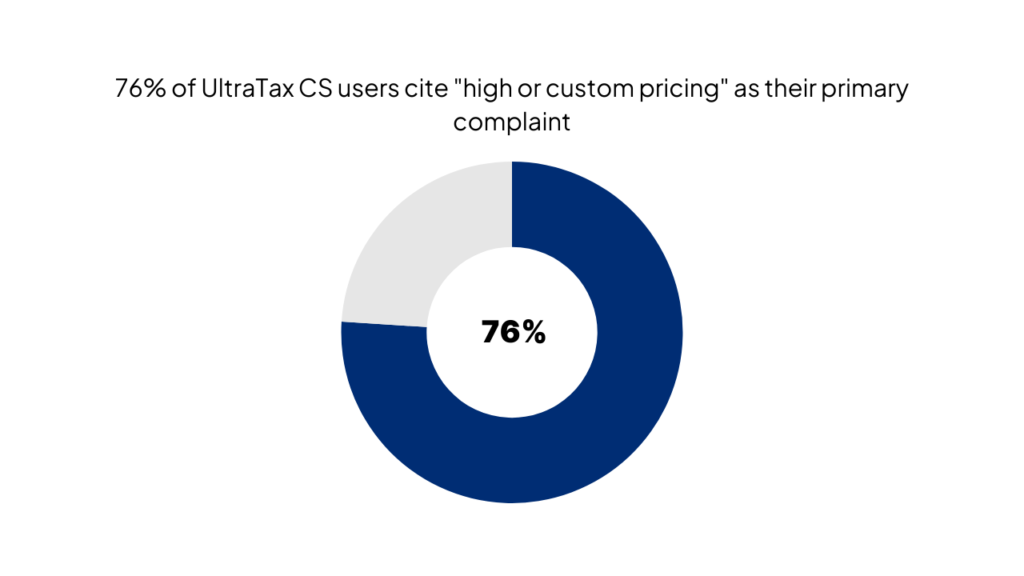
According to aggregated user reviews from G2 and TrustRadius, over 76% of UltraTax CS users cite “high or custom pricing” as their primary complaint.
But cost isn’t the only issue.
Firms struggle with frequent crashes during peak tax season when they need reliability most. Customer support has declined significantly, with users reporting 45-minute hold times and inexperienced agents reading from scripts.
One CPA firm told us their support staff “couldn’t answer basic questions without putting us on hold to search for answers—and we’re paying thousands for this.”
Many firms also find Thomson Reuters too complex for their actual needs. You’re essentially paying for enterprise-grade features you’ll never use while dealing with outdated interfaces and limited cloud capabilities.
How to Evaluate Thomson Reuters Alternatives: 7 Key Criteria
Now that we’ve covered why accounting professionals are exploring alternatives, let’s walk through exactly how to evaluate your options systematically.
Choosing accounting software isn’t like picking office supplies—you’re making a multi-year commitment that affects every team member and client interaction. Here’s what actually matters when comparing Thomson Reuters alternatives.
When comparing Thomson Reuters alternatives, consider these 7 factors:
1. Pricing & Total Cost of Ownership (TCO)
Don’t just look at the sticker price. Calculate the real cost over three years, including implementation fees ($2,000-$15,000), annual licensing, user seats, required modules, hosting fees, and ongoing support contracts. Many “cheaper” alternatives end up costing more once you add mandatory add-ons. According to the Journal of Accountancy, firms typically underestimate true software costs by 30-40%.
2. Core Features vs. Your Actual Needs
List the features you use daily versus those you’ve never touched. Small firms paying for enterprise consolidation tools or international tax compliance modules they’ll never need are throwing money away. Focus on must-haves: tax form support (1040, 1120, 1065), e-file capabilities, client portal access, and document management.
3. Integration Capabilities
Your tax software needs to work with your practice management system, accounting platform, and client communication tools. Check whether alternatives offer native integrations or require expensive custom development.
4. Customer Support Quality
This becomes critical at 10 PM on April 14th. Look for providers offering direct access to experts, not call center queues. Ask about average response times, weekend availability during tax season, and whether support is included or costs extra per incident.
5. Scalability for Growing Firms
Can you add users, modules, or locations without starting over? Cloud-based solutions typically scale more easily than on-premise systems. Consider whether the platform handles multi-state returns, multiple entities, and increasing transaction volumes as your firm grows.
6. Implementation Timeline & Complexity
Thomson Reuters implementations average 3-6 months with traditional partners. Modern alternatives like The Ledger Labs complete setup in 2-4 weeks. Longer implementations mean extended parallel system costs and delayed ROI. Factor in team training time and the learning curve for new interfaces.
7. Training & Learning Curve
According to AICPA practice management research, staff productivity drops 20-30% during the first month with new software. Evaluate training resources, documentation quality, and whether the interface is intuitive enough for your least tech-savvy team members.
Best Thomson Reuters Alternatives by Category
Now that you know how to evaluate alternatives, let’s explore the actual options available across different accounting and tax software categories.
Not all Thomson Reuters alternatives serve the same purpose. Depending on whether you need tax preparation, practice management, legal research, or compliance tools, different platforms excel in different areas. Here’s your category-by-category breakdown.
Tax Software Alternatives
- Drake Tax stands out for budget-conscious firms at $995/year versus $7,000+ for UltraTax CS. It handles all major form types (1040, 1120, 1065, 1041) with unlimited federal e-file. The interface feels dated, but functionality is solid for straightforward returns. Best for: Solo practitioners and small firms under 10 employees who prioritize cost savings.
- Lacerte by Intuit offers enterprise-grade capabilities with notably better customer support than Thomson Reuters. Pricing runs $4,000-$8,000 annually depending on modules, positioning it between Drake and UltraTax. Users praise its calculation accuracy and detailed diagnostic tools. Best for: Mid-size firms handling complex returns who need reliable support.
- ProSeries (also by Intuit) serves the mid-market with simpler pricing around $2,500-$4,500 per year. It shares Lacerte’s tax engine but with a more streamlined interface. Best for: Small to mid-size practices wanting Intuit’s reputation without Lacerte’s complexity.
- CCH Axcess Tax provides cloud-based preparation with real-time collaboration features. Pricing is custom but typically ranges $3,500-$6,500 per user annually. The cloud architecture means your team accesses the same return simultaneously—no more version control headaches. Best for: Firms embracing remote work or multiple office locations.
| Software | Best For | Starting Price | Key Advantage |
|---|---|---|---|
| Drake Tax | Solo/small firms | $995/year | Lowest cost, unlimited e-file |
| Lacerte | Complex returns | $4,000/year | Superior support, detailed diagnostics |
| ProSeries | Growing practices | $2,500/year | Balanced features and cost |
| CCH Axcess | Remote teams | $3,500/year | Cloud collaboration |
Accounting & Practice Management Alternatives
QuickBooks Online Accountant serves as your command center for managing multiple clients. It’s free for accounting professionals and includes client management, time tracking, and direct integration with QuickBooks files. Pair it with tax software for a complete practice solution.
Xero appeals to tech-forward firms with its modern interface and extensive app marketplace (800+ integrations). Pricing runs $13-$70 per client per month. Strong choice if your clients use diverse systems and you need flexibility.
Sage Intacct targets mid-market firms needing true cloud accounting with advanced reporting. Expect $400-$600 per month for core functionality. Best for firms managing their own complex accounting alongside client work.
The Ledger Labs focuses specifically on accounting department automation, using AI to handle repetitive tasks like invoice processing, reconciliation, and reporting. Pricing runs 60-70% below Thomson Reuters while delivering faster implementation (2-4 weeks vs. 3-6 months).
Thomson Reuters vs. The Ledger Labs: Which is Right for Your Accounting Department?
Now that we’ve reviewed alternatives across categories, let’s examine how The Ledger Labs specifically compares to Thomson Reuters for accounting departments.
This head-to-head comparison addresses the pain points we identified earlier: cost, implementation time, automation capabilities, and support quality.
Pricing: Traditional Licensing vs. Modern SaaS
Thomson Reuters operates on traditional perpetual licensing with annual maintenance fees, typically costing $20,000-$50,000 for mid-size accounting departments when you factor in CS Professional Suite modules, support contracts, and hosting. The Ledger Labs uses transparent SaaS pricing at 60-70% lower total cost, with everything included—no surprise fees for support calls or software updates. You pay for what you use, and scaling up or down happens without contract renegotiation.
Automation: Manual Workflows vs. AI-Powered Processing
Here’s where things get interesting. Thomson Reuters requires manual data entry for invoices, expense reports, and reconciliations—activities that consume 15-20 hours per week in typical accounting departments. The Ledger Labs applies AI to automatically capture invoice data, match transactions, flag exceptions, and route approvals. According to internal client data, firms reduce manual processing time by 40-60% within the first quarter.
Implementation: 6-12 Months vs. 2-4 Weeks
Thomson Reuters implementations follow the traditional consulting model: discovery workshops, system configuration, custom development, user acceptance testing, and phased rollouts stretching 6-12 months. You’re running parallel systems and paying double software costs during this period. The Ledger Labs completes standard implementations in 2-4 weeks through pre-configured templates for common accounting workflows. You’re up and running in weeks, not quarters, which means faster ROI and less disruption.
Support: Call Centers vs. Direct Expert Access
With Thomson Reuters, you dial a toll-free number, navigate phone trees, describe your issue to a first-level agent, wait for escalation, and hope someone calls back with an answer. Average wait times exceed 30 minutes during tax season. The Ledger Labs provides direct access to implementation consultants and product experts via email, chat, or scheduled calls—no phone tree, no ticket numbers, no scripts. Response times average under 2 hours during business days.
Focus: Generic ERP vs. Accounting Department Specialization
Thomson Reuters builds for everyone, which means features designed for Fortune 500 legal departments or global tax teams that most accounting departments never touch. You’re paying for complexity you don’t need. The Ledger Labs built its platform specifically for accounting department workflows: accounts payable, accounts receivable, month-end close, and financial reporting. Every feature addresses real accounting pain points, nothing more.
Cost Comparison: What You'll Actually Pay for Thomson Reuters Alternatives
Now that you’ve seen how Thomson Reuters compares to modern alternatives, let’s get into the specific numbers you’ll actually pay.
Transparency about software costs is frustratingly rare in this industry. Vendors hide behind “contact us for pricing,” making it impossible to budget accurately. Here’s what you’ll really spend.
Thomson Reuters True Cost Breakdown
A mid-size firm (10-15 users) typically pays:
- CS Professional Suite licensing: $15,000-$25,000 annually
- UltraTax CS tax software: $5,000-$8,000 per user ($50,000-$80,000 total)
- Implementation/setup: $10,000-$25,000 one-time
- Annual support contracts: $3,000-$6,000
- Cloud hosting (if not on-premise): $800-$1,200 per user per year
- Training: $2,000-$5,000 annually
Total first-year cost: $80,000-$140,000 Total year 2-3 cost: $70,000-$110,000 annually
That’s why firms report spending $20,000-$50,000 for their accounting department software—and that’s before you add specialized modules or additional users.
Alternative Pricing Comparison by Firm Size
Small Firms (1-5 users):
| Solution | Annual Cost | What's Included | Hidden Costs |
|---|---|---|---|
| Thomson Reuters | $12,000–$25,000 | Basic modules | Support, hosting, training extra |
| Drake Tax | $995–$2,500 | Tax prep, unlimited e-file | Limited support, manual workflows |
| The Ledger Labs | $3,000–$6,000 | Full automation, support, training | None — true all-in pricing |
| ProSeries | $2,500–$4,500 | Tax prep, basic practice management | Cloud hosting separate |
Mid-Size Firms (6-20 users):
| Solution | Annual Cost | What's Included | Hidden Costs |
|---|---|---|---|
| Thomson Reuters | $50,000–$100,000 | Enterprise suite | Everything costs extra |
| Lacerte | $40,000–$80,000 | Tax prep, support | Cloud add-on, integrations |
| CCH Axcess | $35,000–$70,000 | Cloud tax platform | Custom development |
| The Ledger Labs | $8,000–$15,000 | Full platform, white-glove support | None |
Hidden Costs to Consider
Beyond the sticker price, watch for these budget killers:
- Implementation fees: Thomson Reuters partners charge $150-$250 per hour for 100-400 hours of consulting. That’s $15,000-$100,000 before you process a single transaction. Modern alternatives include implementation in base pricing.
- Support contracts: Thomson Reuters charges separately for phone support beyond basic tier. Priority support during tax season can add 15-20% to annual costs. Many alternatives include unlimited support.
- Training expenses: Factor in 40-80 hours of team training time at your loaded hourly rate, plus potential consultant-led training at $2,000-$5,000. Some providers offer free video training and documentation.
- Data migration: Moving historical data from your current system costs $5,000-$15,000 with traditional vendors. The Ledger Labs includes migration at no charge.
- Custom integrations: Connecting Thomson Reuters to your other systems requires custom development at consultant rates. Cloud-based alternatives typically offer pre-built integrations.
How to Switch from Thomson Reuters: Step-by-Step Migration Guide
Now that you understand the cost savings available, let’s walk through exactly how to migrate from Thomson Reuters without losing data or productivity.
Switching accounting software feels risky – you’re moving years of client data, customized workflows, and team muscle memory. But with proper planning, migrations happen smoothly. Here’s your phase-by-phase roadmap.
Phase 1: Assessment & Planning (Month 1)
Start by documenting exactly what you use today. Which Thomson Reuters modules are active? What data needs to migrate (client records, tax returns, documents, templates)? Who uses which features daily? This inventory prevents surprises later.
Next, define your requirements for the new system. Don’t just replicate Thomson Reuters—this is your chance to eliminate unnecessary complexity. Focus on must-have features, critical integrations, and workflows that actually matter to your team.
Select your new provider and request a detailed migration plan. Reputable vendors perform discovery calls to understand your data structure, customizations, and timeline constraints. They should provide a written project plan with milestones, responsibilities, and contingency strategies.
Schedule your go-live date for post-tax season (May-June ideally). You need 2-3 months of buffer time and absolutely cannot migrate during January through mid-April when your team is slammed.
Phase 2: Data Migration & Testing (Months 2-3)
Your new provider should handle the technical heavy lifting. They’ll export data from Thomson Reuters (usually via CSV files, database dumps, or API connections), clean and validate information, then import into the new system.
Critical data elements include:
- Client records (contact info, entity details, tax IDs)
- Historical tax returns (minimum 7 years for compliance)
- Open engagements and work-in-progress
- Document libraries and templates
- Chart of accounts and prior year adjustments
Run parallel testing during this phase. Process sample returns in both systems and verify identical outputs. Test your most complex scenarios—multi-state returns, partnership K-1s, consolidated corporate returns. Any calculation differences need resolution before go-live.
Validate integrations with your practice management system, document storage, and client portal. Data should flow automatically between systems without manual re-entry.
Phase 3: Team Training & Go-Live (Month 4)
Train your team in phases by role. Start with administrators and power users who can become internal champions and help train others. Then move to preparers, reviewers, and support staff.
Most modern alternatives offer self-paced video training, live webinars, and one-on-one sessions. Budget 8-12 hours per person for initial training, with additional time for hands-on practice in a sandbox environment.
Implement a soft launch with a limited number of returns. Choose straightforward 1040s or simple business returns—not your most complex clients. This controlled start lets you identify issues before full production.
Run parallel systems for 2-4 weeks during go-live. Process the same returns in both Thomson Reuters and your new platform to ensure accuracy and build team confidence. According to migration consultants, parallel runs catch 95% of issues before they impact clients.
Phase 4: Post-Migration Optimization (Months 5-6)
After go-live, focus on optimization. Are there workflows you’re still doing the “old way” that could be automated? Can you eliminate manual workarounds now that you have better tools?
Gather team feedback weekly during the first month, then monthly after that. What’s working well? What’s frustrating? Where are people falling back to old habits instead of using new features?
Schedule a 30-60-90 day review with your new provider. They should analyze usage patterns, identify underutilized features, and recommend process improvements. This ensures you’re extracting maximum value from your investment.
The Bottom Line
Switching from Thomson Reuters isn’t just about lowering software costs—it’s about eliminating complexity, reducing manual work, and upgrading to tools that actually support the way modern accounting teams operate.
When you compare automation, implementation time, support quality, and long-term pricing, the gap between legacy systems and newer platforms becomes clear.
That’s why more firms are choosing Ledger Labs.
You get faster workflows, real automation, transparent pricing, and hands-on support from experts—not call centers. If you’re ready to reduce software spend by 60–70% while improving team productivity, book a consultation with Ledger Labs and explore your best-fit alternative.