Running multiple companies in Odoo looks straightforward on paper. Until your first consolidated month-end close.
The intercompany balances don’t match. Your entity-level P&Ls add up to a different number than your group report. And nobody can pinpoint exactly where the difference came from.
This guide is written by Ledger Labs’ accounting team, which handles multi-company Odoo accounting services for clients daily, not by a software vendor documenting features.
Odoo’s multi-company module offers a true multi-entity accounting system with separate general ledgers and automated intercompany rules. How you set up your accounting and manage transactions will determine if everything runs smoothly or if you encounter quarterly reconciliation issues.
Key Takeaways
- What multi-company accounting in Odoo actually is (and who it’s for)
- The critical difference between multi-company and branch accounting
- How intercompany transactions work at the journal entry level
- Shared vs. separate chart of accounts, and why it’s the highest-stakes configuration decision
- How consolidated reporting works in Odoo, and where it breaks
- The four mistakes that cause most setups to fail
- When it’s time to bring in an outsourced accountant
Multi-company setup shown for Odoo 17 and 18. If you’re on Odoo 19, consolidation menus may differ by version and edition.
What Is Multi-Company Accounting in Odoo?
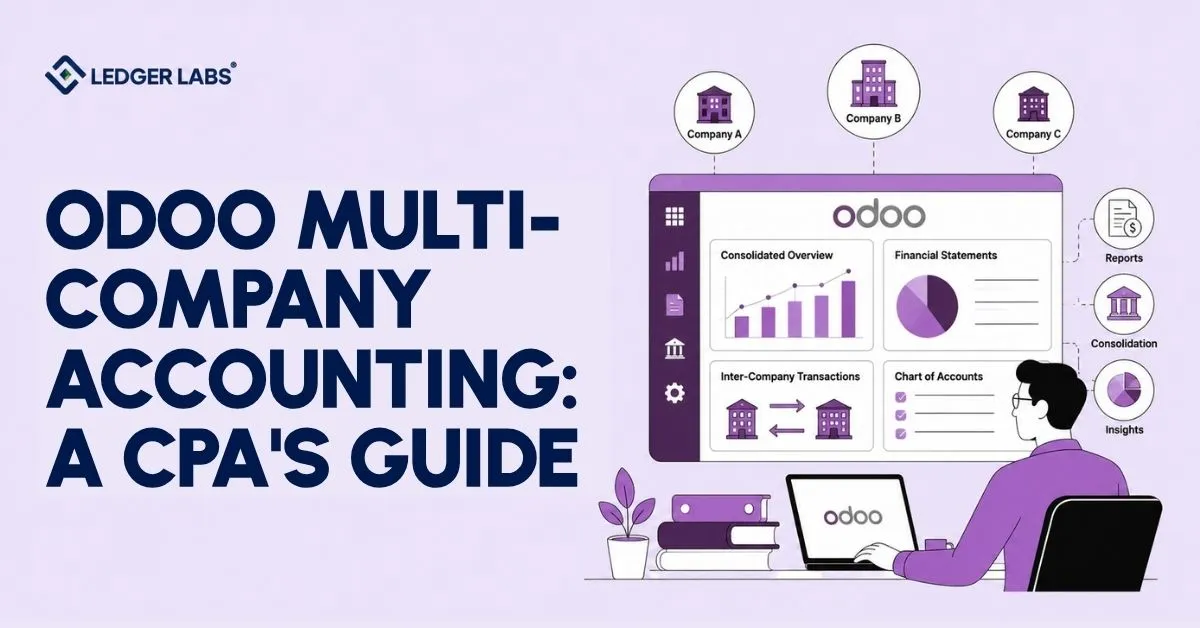
Odoo multi-company accounting lets legally separate business entities run within a single database, each with its own general ledger, bank accounts, tax configuration, and financial statements, while sharing backend infrastructure such as products, vendors, and users.
Here’s what that means for your books.
Each company in your Odoo database operates separately. The revenue of Company A does not mix with Company B’s finances. Their profit and loss statements are distinct. Their balance sheets are different. They can also have different tax setups.
However, they use the same backend. They share the same product catalog and vendor list. Odoo users have specific access controls for each company, ensuring that financial information stays clear and organized.
This structure is built for a specific type of business:
- Holding company operators are a parent entity with multiple subsidiaries under one roof
- Ecommerce brands running multiple storefronts or product lines as separate legal entities
- Manufacturing groups with distinct operating companies for different product lines
- Real estate operators managing individual LLCs per property or portfolio
The Odoo ERP multi-company module is purpose-built for these setups. Not a workaround. Not a configuration trick.
But here’s what most guides won’t tell you.
The software executes your accounting decisions. It doesn’t make them.
How you set up the chart of accounts for different entities, how you create intercompany rules, and how you manage fiscal positions for transactions between companies are key accounting decisions with significant implications.
If you get these right from the start, your multi-company setup will work smoothly. If you get them wrong, you’ll have to deal with reconciliation issues every quarter.
That’s the gap this guide is written to close.
Multi-Company vs. Branch Accounting in Odoo
Multi-company is for legally separate entities with different tax IDs and independent filings. Branches (available from Odoo 17+) are for operational units within the same legal entity that share a tax ID and file as a single entity.
This is the first real decision in any Odoo multi-entity setup, and the most commonly gotten wrong.
Before you touch a single Odoo setting, answer this question: are the entities you’re managing separate legal companies with separate EINs and separate tax filings?
If yes → multi-company.
If no → branches.
It sounds simple. But the accounting consequences are entirely different, and choosing the wrong structure means having to rebuild everything later.
Here’s the decision table:
| Scenario | Multi-Company | Branch |
|---|---|---|
| Separate legal entities (different EINs) | ✅ | ❌ |
| Same legal entity, different locations | ❌ | ✅ |
| Separate state/country tax filings required | ✅ | ❌ |
| Shared chart of accounts required | ❌ | ✅ |
| Intercompany invoicing between units is needed | ✅ | N/A |
| Consolidated group reporting needed | ✅ | ✅ |
Why does this matter so much?
Using multiple companies when branches would work adds unnecessary complexity. Each recharge between divisions becomes a formal intercompany invoice, creating accounts receivable and accounts payable entries that need to be cleared during consolidation. Instead of a simple internal cost allocation, it turns into a month-end reconciliation task.
Fixing this requires reorganizing the entire entity setup, which can be costly to change after twelve months of transactions.
How Intercompany Transactions Work in Odoo?
An intercompany transaction occurs when one entity in your Odoo database sells to, buys from, or lends money to another entity in the same database. Odoo automates the bookkeeping on both sides, but only when the rules are configured correctly on both ends.
Let me walk you through exactly what happens.
Your holding company provides management services to a subsidiary. Company A creates a sales invoice for Company B.
With Odoo’s intercompany rules enabled, here’s what gets recorded automatically:
- Company A: Sales invoice confirmed → Revenue recognized → Accounts receivable created
- Company B: Corresponding vendor bill generated → Expense recognized → Accounts payable created
Both entries are correct at the entity level. Company A earned revenue. Company B incurred an expense. No problem.
Here’s where most people stop thinking about it:
At group consolidation, this transaction is internal. It never involved a third party. If you add up Company A’s revenue and Company B’s expenses without eliminating the intercompany leg, your consolidated P&L will show revenue that was never earned by an outside customer and expenses that were never paid to an outside supplier.
Your consolidated financials are wrong.
This is why intercompany reconciliation is non-negotiable before any consolidated reporting can be trusted.
Company A’s accounts receivable must exactly match Company B’s accounts payable, down to the cent.
Here’s how it works: if your holding company lends $50,000 to an operating subsidiary, Company A will show a receivable (money owed by the subsidiary), and Company B will show a payable (money owed to the holding company).
At the end of the month, these amounts must match exactly. Even a $1 difference suggests a timing issue or a mistake in how the intercompany rules are set up.
Automated intercompany reconciliation in Odoo matches transactions when both sides have correct rules in place. If one side is missing, which is the most common configuration mistake, the reconciliation becomes a manual task at the end of the period.
Chart of Accounts - Shared vs. Separate Across Companies
In Odoo multi-company setups, each company can share a chart of accounts or maintain its own. Shared works best when entities have similar business models. Separate is right when entities are structurally different, but it requires an account-mapping layer at consolidation.
This is the single highest-impact configuration decision in any multi-entity Odoo setup.
And most businesses don’t treat it as a decision at all. They accept whatever default gets applied during setup.
Here’s why that matters:
The case for a shared chart of accounts:
When all entities run on the same chart of accounts, intercompany eliminations run cleanly. Account 4000 on Company A maps directly to account 4000 on Company B. No translation layer needed. Consolidated reporting is straightforward. Management P&L across entities is comparable on the same line items.
This works well when your entities are in the same or adjacent industries with similar revenue and expense structures.
The case for separate charts of accounts:
When businesses use different models, some sell products, others offer services, or manage real estate, relying on a shared chart of accounts can create problems. This approach often doesn’t fit well for anyone.
You may end up complicating the chart to meet everyone’s needs or relying on cost center allocations to fix account mismatches, both of which make month-end closings harder.
Separate charts allow each business to organize itself correctly for its reporting needs. However, consolidating requires clearly mapping accounts to group-level codes before making elimination entries.
The practical recommendation:
Same industry, similar revenue structure → shared chart of accounts. Use analytic accounts for entity-level segmentation.
Different business models, materially different cost structures → separate charts with a consolidation mapping table. More setup work upfront. Significantly less reconciliation work every month-end.
Getting this wrong, particularly by building misaligned, separate charts when a shared structure would work, creates consolidation-mapping problems that are costly to fix retroactively.
Consolidated Financial Reporting in Odoo
Consolidated financial reporting in Odoo combines the financial statements of all entities into a single group-level view, using elimination entries to remove intercompany transactions and prevent double-counting of revenue, expenses, assets, or liabilities. Odoo Enterprise handles this through its consolidation module.
Here’s what that actually involves:
Odoo Enterprise’s consolidation module allows you to link each subsidiary’s accounts to a main group chart of accounts. You can set rules for eliminating intercompany transactions and run the consolidation to create a combined trial balance.
This process also generates your group-level profit and loss statement, balance sheet, and detailed reports for each entity.
The elimination step is where the accounting work happens.
Before consolidated financials mean anything, three categories of intercompany items must be removed:
- Intercompany revenue and expenses: Any sales made by one entity to another within the group. Left in, they inflate consolidated revenue and expenses, which net to zero on the P&L but misrepresent how much genuine third-party activity your group generates.
- Intercompany receivables and payables: The AR/AP balances from intercompany invoices. These must net to zero on the consolidated balance sheet. Any remaining balance after elimination signals an unreconciled intercompany transaction.
- Intercompany loans and investments: If the holding company has invested in a subsidiary or extended a loan to it, both entries must be eliminated. Leaving both in place double-counts the same economic value at the group level.
When one company partially owns another, we use minority interest accounting. This shows the subsidiary’s equity that the parent company doesn’t own separately on the balance sheet. Odoo’s consolidation module can manage this, but it requires careful setup.
Where Odoo’s native consolidation works and where it doesn’t:
For most SMBs running two to five entities with similar business models and an aligned chart of accounts, Odoo’s native consolidation is sufficient.
Where it gets constrained: high-frequency intercompany transactions across many entities, multi-currency consolidations requiring translation adjustments, or complex multi-tier ownership structures. In these cases, Odoo’s consolidation output typically requires supplemental journal entries or an export to an external reporting tool before the group financials are finalized.
Common Mistakes in Odoo Multi-Company Accounting Setups
The four most common Odoo multi-company accounting mistakes are: using multi-company when branches were the right structure; misconfiguring intercompany rules to create one-sided entries; treating setup as IT configuration rather than accounting architecture; and fiscal position errors on cross-entity transactions.
Here’s what each one looks like, and what it costs you:
Mistake 1 - Using multi-company when branches were the right choice
This happens before a single accounting entry is made. A business with multiple locations or divisions under the same legal entity and tax ID builds a full multi-company structure because “multi-company” was mentioned first in the setup documentation.
Result: every recharge between divisions becomes a formal intercompany invoice. AR and AP entries on both sides. Elimination is required at every consolidated close. What should be a simple internal cost allocation becomes a multi-step month-end reconciliation.
Fixing it means restructuring the entire entity setup, after twelve months of transactions have already been posted.
Mistake 2 - Misconfigured intercompany rules creating one-sided entries
Odoo’s intercompany automation requires matching rules enabled on both entities. When one side is missed during setup, Company A is configured, Company B is skipped, and Company A posts a sales invoice. Company B never receives the corresponding purchase bill.
Company A’s AR shows a balance. Company B’s AP shows nothing.
At consolidated close, the elimination entry can’t run against a balance that doesn’t exist on one side. The accountant traces it back through months of manually posted entries to reconstruct what should have happened automatically.
In our experience, this is the most common error in new Odoo multi-company setups.
Mistake 3 - Treating setup as IT configuration, not accounting architecture
The multi-company module lives in Odoo’s Settings menu. That makes it feel like a technical task.
It isn’t.
The accounting decisions embedded in that configuration, the chart of accounts structure, intercompany account codes, fiscal positions across entities, and consolidation mapping require accounting judgment. When the setup is handed to a developer or an operations lead without accounting input, the technical configuration is often correct. The accounting architecture underneath it isn’t.
The result shows up at consolidation: accounts that can’t be mapped cleanly, fiscal positions that apply incorrect tax treatment to intercompany transactions, and a close process nobody designed, resulting in unreconciled balances that accumulate every quarter.
Mistake 4 - Fiscal position errors on cross-entity transactions
Fiscal positions in Odoo control which tax rates apply to transactions based on the counterparty’s location and registration status. In a multi-company setup with entities in different states or countries, fiscal positions must be correctly configured for each intercompany pairing.
When they’re not, intercompany invoices apply the wrong tax treatment, creating a tax liability that shouldn’t exist, or missing tax treatment that does. For US-based multi-entity businesses operating across state lines, this is a real compliance risk.
Add multi-currency accounting to the mix: entities transacting in different currencies, and exchange rate differences between the booking date and the payment date, create foreign exchange gains and losses that require separate accounting treatment at the entity level before consolidation runs.
Each of these mistakes is avoidable. Every single one traces back to accounting architecture decisions being made without accounting input.
When to Bring in an Outsourced Accountant for Odoo Multi-Company?
Hire an outside accountant if your Odoo multi-company closing is often late due to intercompany reconciliation issues, if your consolidated financial statements do not match the total of the individual company statements, or if you are adding new companies to a setup that is still messy.
Most businesses try to manage this themselves first. That’s reasonable.
Here’s where to watch for the signal that it’s time to get outside help:
Signal 1: Month-end close is running long, and the bottleneck is intercompany reconciliation.
If your close consistently takes longer than 10–15 business days and the delay traces back to intercompany balances that won’t match, that’s a structural problem, not a capacity problem. Adding more hours won’t fix it. The accounting architecture needs a review.
Signal 2: Your consolidated P&L doesn’t match the sum of your entity P&Ls.
This means elimination entries aren’t running completely, intercompany transactions have one-sided postings, or there’s a chart of accounts mapping gap preventing clean consolidation. All three root causes require accounting expertise to diagnose and fix.
Signal 3: You’re operating across multiple states or internationally and aren’t confident about the fiscal position configuration.
Cross-border or multi-state intercompany activity has real tax exposure when fiscal positions aren’t configured correctly. This isn’t theoretical; it has filing consequences.
Signal 4: You’re planning to add a third entity before the first two are clean.
Adding complexity to a setup that already has unresolved accounting problems doesn’t resolve those problems. It buries them.
Conclusion
Odoo multi-company accounting works well when set up correctly. Problems usually arise when the configuration is treated only as a technical job. Key accounting decisions, such as the chart of accounts structure, intercompany rules, fiscal positions, and consolidation mapping, should involve accounting input rather than relying on defaults.
Businesses that successfully run Odoo multi-company accounting aren’t necessarily using better software. They have a chart of accounts designed for consolidation, intercompany rules that properly handle every transaction, and a closing process built around accounting needs.
If you’re unsure about the numbers from your consolidated close, the issues usually stem from one of four areas: entity structure, intercompany setup, chart of accounts design, or consolidation mapping. All four can be diagnosed and fixed.
Still chasing intercompany balances at every close?
That’s a setup problem, not a you problem. Book a free 30-minute call with a member of Ledger Labs’ accounting team, and let’s find the root cause together.
FAQs
What is the difference between multi-company and multi-branch in Odoo?
Multi-company in Odoo is for legally separate entities, each with its own tax ID, independent filings, and isolated financial statements. Branches (available from Odoo 17+) are for operational units within the same legal entity that share a chart of accounts and file their financial statements as a single company. The distinction is legal and tax, not technical. Using multi-company when branches would suffice creates unnecessary intercompany accounting complexity that compounds at every consolidated close.
Can Odoo automatically generate intercompany journal entries?
Yes. Odoo’s intercompany rules automatically generate the matching purchase order or vendor bill on the receiving entity when a sales order or invoice is confirmed on the sending entity. Both entities must have the matching rule enabled. When one side is missing, only one entry is posted, creating an intercompany reconciliation gap that surfaces at the consolidated close and requires manual reconstruction to resolve.
Is Odoo multi-company accounting suitable for holding companies?
Yes, holding company structures are a key use for Odoo’s multi-company module. This setup aids with invoicing, fee management, intercompany loans, and group reporting. For holding companies with partial ownership, Odoo’s consolidation module provides the necessary accounting treatment, but complex ownership structures may require additional journal entries.
Can different companies in Odoo share the same chart of accounts?
Yes, in Odoo, businesses can share a chart of accounts or use separate ones. Sharing simplifies the combination of financial reports since both sides use the same codes. Separate charts allow flexibility but require account mapping for consolidation. For similar businesses, a shared chart is usually more efficient.
How do user permissions work across companies in Odoo?
Users can be assigned access to one or multiple companies in Odoo. When a user has multi-company access, they switch between entities using the company switcher in the top navigation bar. Each company’s data remains isolated; a user active in Company A cannot post to Company B unless explicitly granted access. Access controls are configured per user in Settings and should be reviewed as part of any multi-company setup to prevent cross-entity posting errors.
What are the limitations of Odoo multi-company accounting?
Odoo’s multi-company module manages simple multi-entity accounting well. However, it has limitations in complex situations such as frequent cross-entity transactions, complicated ownership structures, and multi-currency consolidations that require translation adjustments. Calculating minority interests and group-level tax provisions can also be difficult, often requiring extra tools or reports. For most small and medium-sized businesses with two to five similar entities, Odoo’s built-in consolidation features work well if set up correctly from the start.