If your business invoices international customers, pays foreign suppliers, or runs subsidiaries in different countries, multi-currency accounting in Odoo isn’t optional, it’s how your books stay clean as you scale. The good news: Odoo handles dual-currency posting and FX gain/loss tracking out of the box.
The catch: the toggle is mechanical, but the accounting decisions that determine whether the data is usable, base currency, rate source, COA structure, permissions, ASC 830 treatment, happen before activation.
This guide walks through everything we do for our $2M–$50M ecommerce and manufacturing clients running Odoo: the four-step activation, the FX policy decisions to document before you flip the switch, how to record customer invoices and vendor bills correctly, multi-company consolidation, ASC 830 compliance, and the six most common mistakes we clean up when taking over books from internal teams or prior bookkeepers.
Whether you’re setting up Odoo multi-currency for the first time or fixing a setup that’s already drifting, the framework below is the one we apply across client engagements.
Key Takeaways
- Multi-currency accounting in Odoo records every cross-currency transaction in two currencies simultaneously, with automated FX gain/loss tracking on settlement.
- Activation takes an afternoon. The accounting decisions you make beforehand determine whether your books stay clean.
- Decide your base currency, rate source, update frequency, and COA structure before enabling multi-currency in Odoo.
- Realized and unrealized FX gains belong in separate chart-of-accounts entries — your books, your CFO, and your auditor will all want this distinction.
- Multi-company multi-currency consolidation requires a written rate-source policy, not just Odoo settings.
- ASC 830 translation rules apply on top of Odoo’s mechanics: assets and liabilities at closing rate, P&L at average, equity at historical, translation gain/loss to OCI.
- The configuration is mechanical; the ongoing close, reconciliation, and reporting are where most $2M–$50M businesses need Odoo accounting services rather than DIY accounting.
What Is Multi-Currency Accounting in Odoo?
Multi-currency accounting in Odoo records every cross-currency transaction in both the transaction currency and your company’s base currency, with automated FX gain/loss tracking.
Here’s how it works at the journal entry level. If a US-based company invoices a French customer for €10,000, Odoo records it in both euros (EUR) and US dollars (USD) at the day’s exchange rate.
For example, if the rate is €1 = $1.0850, Odoo shows €10,000 and $10,850 as receivable. When the customer pays 30 days later at a different rate, Odoo calculates any foreign exchange gain or loss and posts it to the correct account.
This differs from systems that display foreign currency on invoices but book everything in the base currency. Those setups create reconciliation gaps the moment exchange rates move. Odoo’s dual-posting model keeps the books accurate in both currencies at every step, which is what your auditor, your CFO, and your tax preparer all need.
That’s the mechanics. The accounting decisions that determine whether the data is usable come before activation.
Why Multi-Currency Accounting Matters for Growing Businesses?
If your business generates $2M–$50M in revenue and frequently conducts foreign transactions, you need a multi-currency setup. Without it, you’ll face extra work with conversions and record-keeping issues. A proper system automates postings and currency calculations, allowing your team to concentrate on policies and reviews.
The trigger points we see most often across our Odoo accounting for startups and growth-stage clients fall into a handful of patterns:
- Ecommerce brands paying overseas Shopify, Meta, or Google ad spend in EUR or GBP, where weekly currency swings start moving margins.
- SaaS companies bill international customers in their local currency to reduce friction at signup.
- Manufacturing businesses buying components, tooling, or freight from foreign suppliers in those suppliers’ currencies.
- Multi-entity businesses with subsidiaries in different countries, where each entity needs its own base currency and consolidation rolls up to the parent.
- US-based companies receive wires from overseas customers when those wires settle at a different rate than the rate on the invoice.
- Inventory-heavy operations with landed costs that include foreign-currency freight, duties, or insurance.
If two or more of these describe your business, multi-currency accounting isn’t optional infrastructure; it’s table stakes for clean books.
How to Activate Multi-Currency in Odoo?
Activation is mechanical. Most of the value of getting it right comes from the accounting decisions made before you touch the toggle, base currency, rate source, COA structure, and permissions. With those decisions documented in your FX policy memo, the activation itself takes only 20 minutes.
We walk our clients through the same four-step sequence below before turning on multi-currency in their production Odoo environment.
Step 1: Confirm Your Base Currency Is Set Correctly
Path: Settings → Companies → [Your Company] → Currency
Before enabling multi-currency, verify that your base (company) currency matches your reporting currency for financial statements. For US-based businesses, this is USD in nearly every case.
This sounds obvious, but we’ve cleaned up multiple Odoo environments where the base currency was set to EUR or GBP because the original implementation pulled a default from a non-US localization template.
Once transactions post against the wrong base currency, fixing them is invasive: every historical journal entry must be revalued. Catch it before the first cross-currency transaction ever hits the books.
Step 2: Enable Multi-Currency in Accounting Settings
Path:
- Accounting → Configuration → Settings → Currencies
- Toggle the Multi-Currencies option on and save.
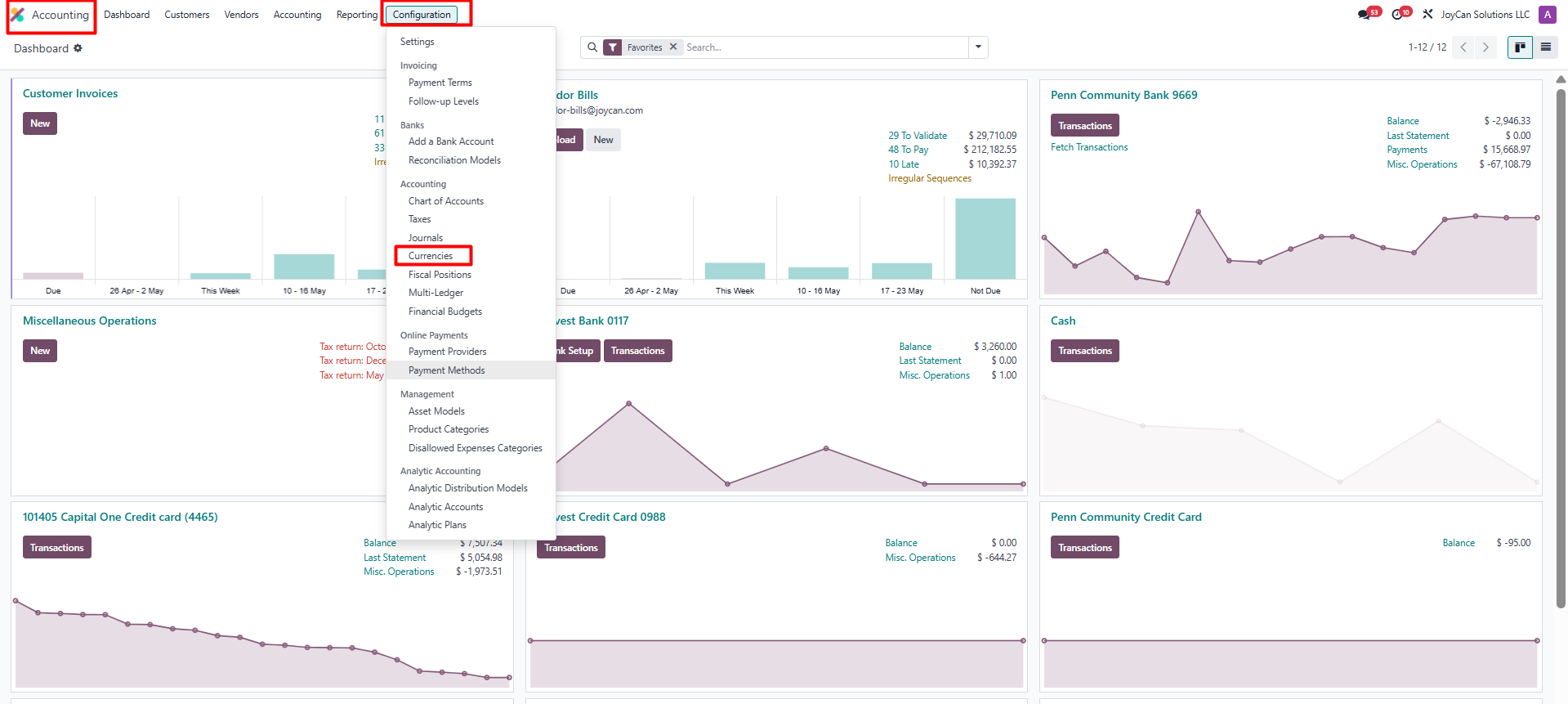
Enabling this single setting activates currency fields across the platform, invoices, vendor bills, payments, journals, and the chart of accounts can now carry foreign currencies. Odoo also creates a default exchange rate journal in the background.
From an accounting standpoint, this is the moment your books gain dual-currency capability. Every transaction posted from this point forward can carry a foreign currency, which is why the next two steps matter before you start transacting.
Step 3: Activate Only the Currencies You Actually Use
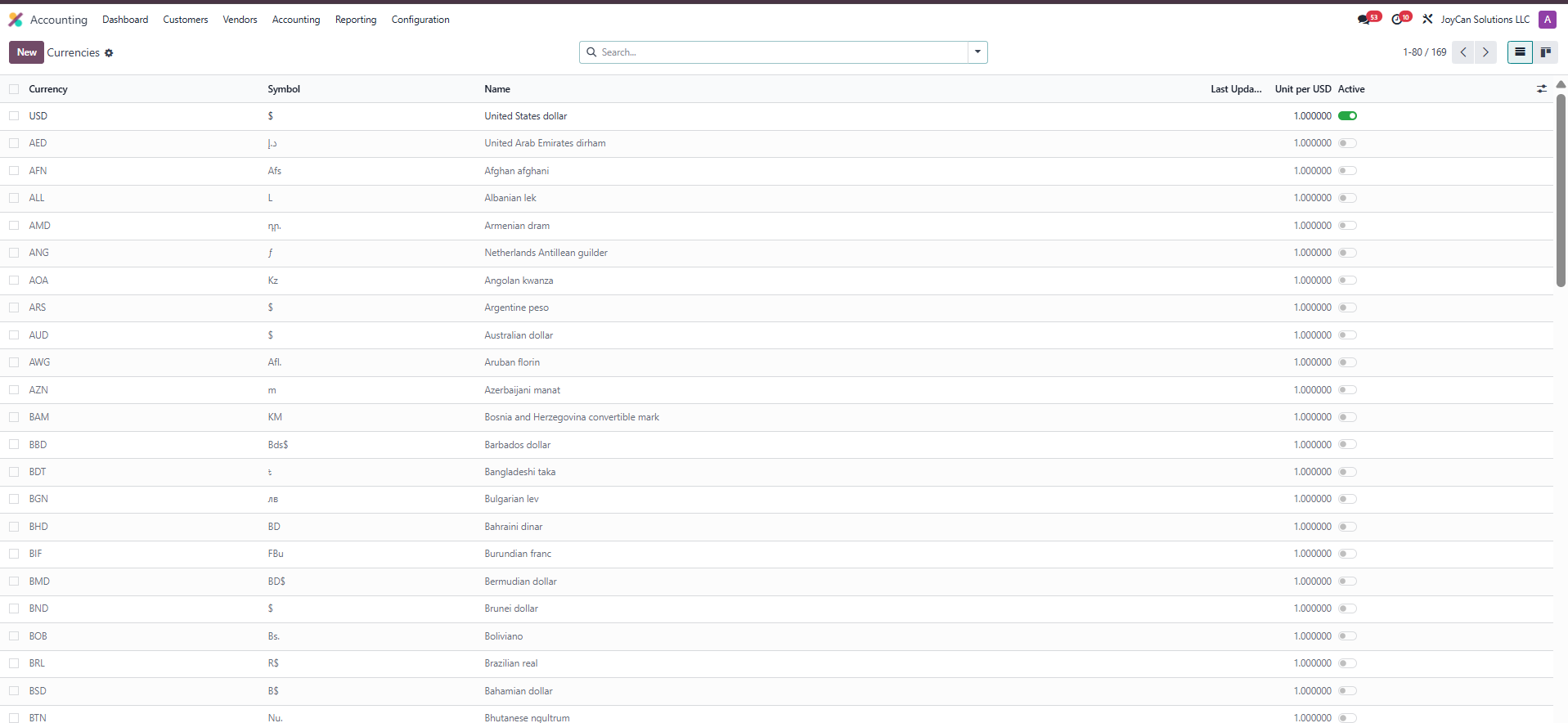
Path: Accounting → Configuration → Currencies
You’ll see a list of all the currencies Odoo supports. Activate only the ones your business actually transacts in.
Step 4: Configure Exchange Rate Updates
Path: Accounting → Configuration → Settings → Currencies → Automatic Currency Rates
Odoo can pull rates automatically from sources including the European Central Bank reference rates, FloatRates, Yahoo Finance, and (depending on your localization) the Mexican Bank. You can also leave rates set to manual.
Here’s the framework we use to set rate sources for client books:
| If your business... | Recommended rate source | Update frequency |
|---|---|---|
| Transacts in major currencies (EUR, GBP, JPY, CAD, AUD) | ECB or FloatRates (automatic) | Weekly |
| Transacts in niche or volatile currencies | Manual entry, documented source per update | As-needed |
| Runs multi-entity with intercompany flows | One automatic source across all entities | Weekly, same day across entities |
| Needs exact spot rates for tax or audit positions | Manual, locked at transaction date | Per transaction |
Daily updates create unnecessary noise in audit trails without significantly impacting financial results. Most clients benefit from weekly updates. For businesses with multiple entities, all entities must use the same rate source on the same day to ensure proper month-end consolidation.
Setting Your FX Policy Before You Touch Odoo
Software does not decide accounting policies. Odoo offers choices to help. Answering the questions below will ensure your financial records pass audits, support funding, and close each quarter smoothly. Make these decisions before activation, document them in a one-page memo, and update the memo as your business changes.
Decision 1: Spot Rate vs. Period-End Rate
A spot rate is the exchange rate at the moment a transaction occurs- what Odoo uses when an invoice is issued, a bill is recorded, or a payment is received. A period-end rate is the closing rate on the last day of the accounting period, used to revalue open foreign-currency balances on the balance sheet.
The accounting rule:
| Event | Rate to use |
|---|---|
| Invoice issued / bill recorded | Spot rate (transaction date) |
| Payment received/paid | Spot rate (settlement date) |
| Open foreign-currency balances at period close | Period-end rate (revaluation only) |
| Equity accounts (per ASC 830) | Historical rate (date of original transaction) |
Decision 2: Realized vs. Unrealized FX and Why They Need Separate COA Entries
A realized FX gain or loss happens when a foreign-currency transaction settles. The customer pays the invoice. The vendor cashes your check. The bank converts the wire. Cash has moved. The difference between the booking rate and the settlement rate is real, locked in, and reportable.
An unrealized FX gain or loss is the result of a period-end revaluation entry. No cash has moved. The system marks open foreign-currency balances to the closing rate so the balance sheet reflects current economic reality. The entry reverses at the start of the next period; if and when the underlying transaction settles, a realized entry replaces it.
These two should never share a chart of accounts entry. Our standard COA structure for client books:
| Account | Account type | Where it appears | Why it matters |
|---|---|---|---|
| Realized FX Gain / Realized FX Loss | Other income / Other expense | P&L (non-operating) | Auditor-ready, separates real cash impact from estimates |
| Unrealized FX Gain / Unrealized FX Loss | Other income / Other expense | P&L or OCI (per ASC 830 for translation) | Keeps non-cash estimates clearly identifiable |
| CTA (Cumulative Translation Adjustment) | Equity (OCI section) | Balance sheet | Required for ASC 830 multi-entity translation |
Bookkeepers who collapse realized and unrealized amounts into a single account save themselves 5 minutes during setup but cost their successor 20 hours during the first audit. We’ve cleaned this up enough times across client books to put it in our standard policy template.
Decision 3: Who Has Permission to Update Exchange Rates
Exchange rate updates are a financial control. One miskeyed rate retroactively distorts every downstream report, open invoices revalue, FX gains/losses recalculate, and causes consolidation breaks.
The default we apply to client environments:
| Role | Permission | Audit trail |
|---|---|---|
| Accountant / Controller / CFO | Update rates | Logged in Odoo |
| Operations / Sales / Customer Service | View-only | – |
| All rate changes | Logged automatically by Odoo | Reviewed monthly during close |
For smaller teams where one person handles both ops and books, build a lightweight approval workflow, even a documented Slack confirmation before each manual rate update, rather than skipping the control entirely. The cost of a controls failure here is hours of cleanup; the cost of a one-line approval policy is nothing.
Decision 4: Document the Policy Before Enabling Multi-Currency
The four decisions above belong in a one-page FX policy memo:
- Base currency (typically USD for US businesses)
- Rate source and update frequency (ECB / FloatRates / manual; weekly / per-transaction)
- Realized vs. unrealized treatment (separate COA entries; CTA account if multi-entity)
- Permissions and approval workflow (who can update; how it’s logged; how it’s reviewed)
We store this memo with each client’s accounting documentation. It serves three purposes: it gives the bookkeeping team a single source of truth, it provides the auditor with a documented control, and it gives whoever takes over the books next a head start rather than a forensic project.
Configuring Foreign-Currency Journals in Odoo
Path:
Accounting → Configuration → Journals → [select journal] → Currency
Odoo journals can process transactions in any active currency, but you can also limit a journal to just one currency. This means all entries in that journal must use that currency.
In our client books, we typically split journals by currency for one of three reasons:
| Scenario | Why we use a dedicated foreign-currency journal |
|---|---|
| Foreign-currency bank account (e.g., a EUR account at a US bank) | Clean reconciliation, every entry matches the bank statement currency |
| Intercompany flows between parent and subsidiary | Clean elimination during consolidation; auditor can trace each entity's side |
| High-volume foreign-currency AP (e.g., a EUR-pay supplier paid weekly) | Easier monthly review and reduces the chance of mis-currency entries |
A short worked example: A US client has a Dutch subsidiary that issues monthly intercompany invoices to the US parent in euros (EUR). Instead of mixing these invoices with USD vendor bills, we created a separate Intercompany – EUR journal for the parent. Now, the parent’s accountant only sees intercompany EUR entries, making month-end elimination a simple lookup.
The main question is not which journals can handle foreign currency; Odoo allows all journals to use any active currency. The key question is which entities and transaction types need a separate journal. This is a decision about the chart of accounts and reporting structure. We usually separate intercompany transactions at the journal level to facilitate elimination of intercompany balances during consolidation.
Recording Multi-Currency Customer Invoices in Odoo
Path:
Accounting → Customers → Invoices → New Invoice
When you create a customer invoice and select a foreign currency in the Currency field, Odoo books the invoice simultaneously in the foreign (transaction) currency and your base currency, using the exchange rate set for that day.
| Account | Debit (transaction currency) | Debit (USD base) | Credit (transaction currency) | Credit (USD base) |
|---|---|---|---|---|
| Accounts Receivable | £3,950 GBP | $5,000.00 | – | – |
| Service Revenue | – | – | £3,950 GBP | $5,000.00 |
Both sides of the entry show the GBP amount and the USD equivalent. The invoice itself prints in GBP for the customer; your books carry both currencies on the same journal entry, linked to the same invoice ID.
Default Rate Source
Odoo applies the rate from your configured currency rate source, the one set in Accounting → Configuration → Settings → Currencies → Automatic Currency Rates.
If automatic updates are on, Odoo uses the most recent imported rate. If you’re on manual rates, Odoo uses the latest rate you’ve entered for that currency pair.
You can override the rate at the invoice level if a contract specifies a fixed rate (some enterprise clients lock rates per quarter). When you override, document the reason; your auditor will ask why a specific transaction posted at a non-system rate.
Customer-Side Reporting
The customer sees a clean invoice in their currency: £3,950 GBP, no USD reference, no exchange rate disclosure. They’ll pay in GBP and reconcile in GBP on their side. Your books carry the dual-currency entry and the FX exposure until settlement. When the customer pays, at whatever rate prevails on the payment date, Odoo automatically calculates the realized FX gain or loss and posts it to your Realized FX account.
Recording Multi-Currency Vendor Bills in Odoo
Path:
Accounting → Vendors → Bills → New Bill
The vendor bill flow mirrors the customer invoice flow, with one important difference: dual posting, which we’ll cover below.
Worked Scenario: US Company Paying a EUR Supplier
A US-based manufacturing client receives a vendor bill for €4,000 EUR from a German component supplier. The exchange rate on the bill date is €1 = $1.0850, making the USD equivalent $4,340.
When the bill is validated, Odoo posts this journal entry:
| Account | Debit (transaction currency) | Debit (USD base) | Credit (transaction currency) | Credit (USD base) |
|---|---|---|---|---|
| Inventory or Expense | – | – | – | – |
| Inventory or Expense | €4,000 EUR | $4,340.00 | – | – |
| Accounts Payable | – | – | €4,000 EUR | $4,340.00 |
Two weeks later, the client pays the bill from a USD operating account. The exchange rate has moved to €1 = $1.0925, so the USD draw to settle €4,000 is now $4,370, $30 more than the original booking. Odoo automatically posts the realized FX loss:
| Account | Debit (transaction currency) | Debit (USD base) | Credit (transaction currency) | Credit (USD base) |
|---|---|---|---|---|
| Inventory or Expense | – | – | – | – |
| Inventory or Expense | €4,000 EUR | $4,340.00 | – | – |
| Accounts Payable | – | – | €4,000 EUR | $4,340.00 |
The €4,000 supplier ledger clears in EUR; the USD ledger reflects the actual cash outflow plus the realized FX loss.
How AP Differs From AR in Dual-Posting?
In the AR flow, the FX exposure runs against you: you’ve committed to receiving a fixed foreign-currency amount, and your USD equivalent fluctuates until the customer pays. In the AP flow, the exposure runs for you in liability terms; you owe a fixed foreign-currency amount, and your USD cost fluctuates until you pay.
The journal entry mechanics are identical (dual-currency posting, automatic FX gain/loss on settlement). The risk profile is opposite, which is why your CFO will want both sides reported separately on the realized FX P&L lines, not netted into a single “FX gain (loss)” figure.
Reconciling Against the Supplier's Records
Suppliers typically reconcile in their own currency. When your client pays €4,000 EUR and the supplier receives €4,000 EUR, both sides should agree on the foreign-currency amount. Where reconciliation gets messy is when bank fees, intermediary banks, or wire spreads cause the supplier to receive less than €4,000; they’ll send a short-pay notice, and the difference needs to be booked as a bank fee or FX adjustment on your side, not as a vendor dispute.
We see this most often on smaller European suppliers who use intermediary banks that strip 5–25 EUR per wire. Build a small allowance into your AP reconciliation process for these residuals; they’re noise, not errors.
Multi-Company and Multi-Currency in Odoo
If your business operates a parent company plus one or more foreign subsidiaries, multi-company is where Odoo’s multi-currency capabilities earn their keep, and where the accounting policy work becomes non-negotiable.
Setting Up the Parent + Subsidiary Structure
Path:
Settings → Companies → Manage Companies
Each entity in your structure is a separate company in Odoo, with its own base currency, chart of accounts, journals, and reporting. The standard setup we apply for client books:
- Parent entity: US holding company, base currency USD, consolidates the subsidiaries
- Subsidiary 1: German operating entity, base currency EUR
- Subsidiary 2: UK operating entity, base currency GBP
When you create each company in Odoo, set the company’s base currency at creation, not after. Changing base currency on an entity that has already posted transactions is invasive and usually requires data migration help. Get it right the first time.
Intercompany FX: What Posts Where
When a subsidiary invoices the parent, for management fees, intercompany loans, or transfer-priced inventory, the dual-posting logic from earlier sections applies on both sides, but on different sets of books.
A worked example: the German EUR subsidiary issues a €10,000 management fee invoice to the US parent. Exchange rate that day: €1 = $1.0850.
| Books | Account | Debit | Credit | Currency view |
|---|---|---|---|---|
| Parent (USD books) | Management Fee Expense | $10,850 | – | €10,000 / $10,850 |
| Parent (USD books) | Intercompany Payable - Germany | – | $10,850 | €10,000 / $10,850 |
| Subsidiary (EUR books) | Intercompany Receivable - US | €10,000 | – | (single currency) |
| Subsidiary (EUR books) | Management Fee Revenue | – | €10,000 | (single currency) |
The parent carries the EUR amount alongside its USD equivalent (dual posting). The subsidiary, operating in EUR as its base currency, carries only the EUR side. At month-end, both sides should agree on the EUR amount. The USD equivalent on the parent’s side is what creates the FX exposure that revaluation will adjust.
Consolidation Prep: One Rate Source, Same Day, All Entities
The single most common multi-entity mistake is having different entities pull rates from different sources, or pull them on different days. The result: when you consolidate, intercompany balances don’t tie out, and the difference shows up as an unexplained translation residual.
The rule we apply across every multi-entity client:
- One rate source for all entities (typically ECB or FloatRates)
- Updated on the same day across all entities (the day before close cutoff, weekly otherwise)
- Locked during the close period (no rate changes between cutoff and consolidation publication)
Document this in your FX policy memo. Software can’t enforce a cross-entity rate-source policy on its own.
Common Multi-Currency Mistakes (and How to Avoid Them)
Below are the six most common multi-currency mistakes we encounter when taking over Odoo books from internal teams or prior bookkeepers. Each is fixable, but the cost of fixing during a clean transition is far lower than the cost of cleanup mid-audit.
1. Overwriting Historical Exchange Rates Instead of Adding New Ones
When the rate changes, the correct action is to add a new rate entry with a new effective date. The wrong action, and one we see often, is editing the existing rate row to the new value. That retroactively re-rates every transaction posted under the old rate. Open invoices revalue. Realized FX gains/losses recalculate. Audit trail breaks.
Fix: Train your team to add, not edit. Restrict rate-edit permissions to accounting roles only.
2. Missing Rate Coverage on Weekends and Holidays
ECB and most automatic rate sources don’t publish on weekends or major holidays. If a transaction posts on a Saturday and no rate exists for that date, Odoo falls back to the most recent rate, usually Friday’s. That’s normally fine, but if a critical transaction posts at month-end and the rate source had a gap, your close can be off by the residual difference.
Fix: Verify rate coverage as a step in your month-end close checklist. Backfill manual rates for any missing days before posting period-end revaluation entries.
3. Ignoring Small FX Residuals at Reconciliation
When a customer pays an invoice or you settle a vendor bill, the realized FX entry usually clears the foreign-currency receivable or payable to zero, but tiny residuals ($0.50, $2, $7) show up regularly due to rate-source rounding or bank conversion spreads. Bookkeepers sometimes leave these open, intending to “deal with them later.” Six months later, the supplier or customer ledger has dozens of small open items that obscure real reconciliation issues.
Fix: Establish a residual write-off threshold (we typically use $25) and clear sub-threshold residuals to a Bank Fees / FX Adjustment account at month-end as part of the close process.
4. Mixing Realized and Unrealized FX in the Same COA Account
Collapsing realized and unrealized FX into a single chart of accounts entry is the most common COA setup mistake we clean up. Realized is real cash impact; unrealized is a non-cash estimate that reverses next period. When they share an account, your auditor can’t separate them, your CFO can’t report on them properly, and your tax preparer has to do extra work to back out unrealized amounts (which aren’t taxable in most cases).
Fix: Maintain separate COA entries for Realized FX and Unrealized FX, both as Other Income/Other Expense accounts. The CTA (Cumulative Translation Adjustment) account belongs in equity if you have multi-entity translation under ASC 830.
5. Forgetting Intercompany Rate Alignment Across Entities
When a parent and subsidiary post intercompany transactions on different days using different rate sources, the EUR (or other transaction currency) amount agrees, but the USD-equivalent doesn’t tie. At consolidation, the unmatched difference appears as a translation residual that needs to be explained.
Fix: Lock the rate source policy at the group level: same source, same day, every entity. Document the policy and review compliance during close.
6. Letting Non-Accounting Users Update Exchange Rates Without a Permission or Approval Workflow
When operations, sales, or customer service team members can update exchange rates, mistakes are inevitable, and a single miskeyed rate can retroactively distort every downstream report. We’ve cleaned up books where a salesperson updated a rate “to match what the customer’s bank quoted,” not realizing it would re-rate every open invoice in that currency.
Fix: Restrict rate-update permissions to accounting and controller roles. For very small teams, build a lightweight approval workflow, even a documented Slack confirmation before each manual rate update. Log every rate change in Odoo’s audit trail and review the log monthly during close.
Conclusion
Activating multi-currency in Odoo takes an afternoon. Running clean multi-currency books every month is the real work: current rates, reconciled FX accounts, correctly classified realized and unrealized gains, intercompany alignment, and ASC 830-compliant consolidation.
That work is accounting, not configuration. It’s what we do for ecommerce and manufacturing companies running Odoo: own the FX policy, run the monthly close, reconcile the foreign-currency accounts, post the period-end revaluation, and produce consolidation reporting that holds up under audit.
If your Odoo books are showing FX issues at quarter close, or you want to set them up correctly before they do, book a free consultation.
FAQs
What is multi-currency accounting in Odoo?
Multi-currency accounting in Odoo records every cross-currency transaction in both the transaction currency and your company’s base currency simultaneously. The system automatically tracks FX gains and losses, posts dual-currency journal entries, and supports consolidation across multiple entities. Activation is straightforward; the accounting policy decisions that make the data usable- rate sources, COA structure, permissions, happen before activation.
Does Odoo automatically update exchange rates?
Yes, Odoo can pull rates automatically from sources including the European Central Bank, FloatRates, Yahoo Finance, and (depending on the localization) the Mexican Bank. You can configure the update frequency; typically, weekly is appropriate for $2M–$50M businesses; daily creates audit-trail noise without changing financial outcomes. Manual rate entry remains an option for niche currencies or when you need to control exact spot rates.
How does Odoo handle realized vs. unrealized FX gains and losses?
Realized FX is booked when a cross-currency transaction settles; Odoo posts the difference between the booking rate and the settlement rate to your Realized FX Gain/Loss account. Unrealized FX is booked at period-end via a revaluation entry that restates open foreign-currency balances at the closing rate. The unrealized entry reverses at the start of the next period. Both should land in separate chart-of-accounts entries.
Can I record customer invoices in foreign currencies in Odoo?
Yes, after you activate multi-currency, each customer invoice displays a transaction currency. Odoo records it in both the foreign and base currencies using your chosen rate source. The customer sees the invoice in their currency, and your records show it in both. The journal entry creates dual amounts and posts them to the correct Accounts Receivable account.
How do I record vendor bills in a foreign currency?
Use the same flow as customer invoices, applied to the vendor side. Open a new bill, select the supplier’s currency, and Odoo posts dual-currency entries to your AP account. When you pay the bill from a base-currency or different-currency bank account, Odoo calculates and books the realized FX gain or loss automatically. Reconcile the supplier’s records against yours periodically; small rate differences are normal.
Does Odoo support multi-company multi-currency consolidation?
Yes, Odoo’s multi-company functionality allows parent and subsidiary entities to operate in different base currencies, and the Consolidation app translates subsidiary financials into the parent’s reporting currency. Critical: subsidiaries must use a consistent rate source and update cadence, or consolidation won’t reconcile. The consolidation logic itself is software; the rate-source policy is accounting work.
What's the most common Odoo multi-currency setup mistake?
Skipping the FX policy memo. Most businesses turn on the multi-currency toggle, start transacting, and only realize they need a written policy when quarter-end doesn’t reconcile or an auditor asks for documentation. The mistake is treating multi-currency as a software setup task instead of an accounting setup task. A one-page policy memo covering rate sources, COA structure, permissions, and revaluation cadence prevents most of the issues we see in client cleanups.