Around 67% of ERP implementations fail because companies choose software that doesn’t align with their actual operational needs.
The stakes are high: pick wrong, and you’re looking at costly migrations, frustrated teams, and months of lost productivity.
We’ll compare Odoo vs Sage across features, costs, scalability, and user experience so you can make the right call for your accounting software needs.
Let’s get started.
Key Takeaways
- Odoo is built for flexible, modular growth—ideal if you need CRM, inventory, e-commerce, or manufacturing to sit alongside accounting in one system.
- Sage is strongest where regulation and compliance dominate, especially in industries that rely on strict audit trails, payroll rules, and industry-specific reporting.
- For most comparable setups, Odoo usually delivers a 40–60% lower three-year total cost of ownership than Sage, particularly for 1–100 user SMBs.
- Migration effort should factor into your first decision: Sage is harder and more expensive to move away from later, while Odoo’s open ecosystem makes future changes less painful.
- The right choice depends on your next 3–5 years, not just today’s pain points—fast-growing, integration-heavy businesses tend to outgrow Sage, while compliance-heavy, conservative operations often benefit from Sage’s maturity.
A Quick Overview
While Sage built its reputation on accounting compliance and payroll precision, Odoo disrupted the market with all-in-one flexibility and modern integrations.
The question isn’t which is “better”.
It’s what aligns with your business growth trajectory.
Are you a startup that needs affordable tools that grow with you, or an established business that needs industry-specific compliance features ready out of the box?
Which is why we will be dissecting each of these ERPs one by one so that you’re able to picture what your business would look like if you implement either one.
Also Read: Odoo vs Xero
Odoo vs Sage: Feature-by-Feature Comparison
The feature gap between Odoo and Sage isn’t about one being “better” overall.
It’s about one being better for specific business models.
Here’s how both contrast:
1. Core Accounting Features
- Odoo brings automation-first accounting: Multi-currency support across 85 languages and 80+ countries, AI-powered OCR that recognizes vendor bills in under 10 minutes, automated cost of goods sold (COGS) entries, SEPA direct debit for European payments, and automated deferred revenue management. If you’re juggling international clients or processing high volumes of invoices, Odoo’s automation saves hours weekly.
- Sage delivers compliance-first accounting: Advanced VAT management, DSN social declarations for French companies, comprehensive tax audit reports, robust payroll (especially Sage 100 Paie), strong fixed asset management, and multi-level analytical accounting. When your accountant asks if your software handles Section 179 depreciation or multi-entity consolidation, Sage already has the answer built in.
Winner: Sage for regulatory compliance; Odoo for integrated automation and international operations.
| Feature | Odoo | Sage |
|---|---|---|
| Best For | International businesses → Odoo | Regulated industries → Sage |
| Multi-currency support | 85 languages | 10 languages |
| Tax compliance | Good | Excellent |
| OCR bill scanning | ✓ Real-time (<10 min) | Limited |
| Payroll management | Via integrators | Native (full DSN) |
2. CRM & Sales Management
Odoo’s CRM feels like it came from 2025: Visual pipeline management, lead scoring based on behavior, automated email campaigns triggered by customer actions, integrated e-commerce with inventory sync, and no-code workflow customization through drag-and-drop. Your sales team can build custom follow-up sequences without calling IT.
Sage’s CRM feels like it came from 2005: Traditional sales tracking with customer records, quote-to-invoice workflows, basic CRM for customer follow-up and simple reminders. It gets the job done if you’re just tracking who owes what, but don’t expect marketing automation or lead nurturing.
Winner: Odoo by a significant margin (unless you literally only need quote-to-invoice functionality).
3. Inventory & Operations
- Odoo covers modern warehouse needs: Real-time tracking across multiple locations, barcode scanning through mobile devices, multi-warehouse management, dropshipping automation, and perpetual inventory valuation using FIFO, Average Cost, or Standard Price methods. If you’re running e-commerce or managing complex supply chains, Odoo connects inventory to sales orders automatically.
- Sage handles traditional inventory well: Robust inventory reporting (especially Sage 300), purchase order management with approval workflows, and a strong manufacturing module in Sage X3 for production scheduling. It’s built for businesses that need detailed financial inventory tracking rather than real-time warehouse operations.
Winner: Depends on whether you need modern warehouse automation (Odoo) or detailed financial inventory controls (Sage).
4. Customization & Integration
- Odoo gives you 10,000+ possibilities: Over 10,000 apps in the marketplace, open-source code access for complete customization, REST API for building your own integrations, Zapier and Make connectors for no-code automation, and a drag-and-drop website builder. You can connect Odoo to Stripe, Shopify, HubSpot, or your custom internal tools without hiring a developer.
- Sage keeps you in their ecosystem: Pre-defined modules with limited flexibility, certified developer requirement for any serious customization, Microsoft 365 integration (their strongest connection), and limited third-party SaaS connectivity. Want to connect Sage to your marketing automation platform? You’ll probably need a certified partner and a project budget.
Odoo vs Sage Pricing Breakdown (With Hidden Fees)
Now that we’ve explored the features that differentiate these platforms, let’s tackle the question that actually determines your decision: what will this cost us?
Why do Sage quotes vary by $20,000 between different implementation partners? Because ERP pricing is deliberately opaque—and we’re about to fix that.
1. Odoo Pricing
- Community Edition: Completely free with unlimited users and access to one app, but you get no official support, no hosting, and none of the advanced features like automation or OCR scanning. Think of it as a test drive, not a daily driver.
- Enterprise Edition: $24.90 per user per month with monthly billing, or roughly $20 per user per month if you commit annually. Want more than accounting? Each additional app (CRM, Inventory, Manufacturing) costs about $12-15 per user per month.
- Implementation costs: $5,000 to $25,000 depending on complexity, data volume, and customization needs. A basic accounting + CRM setup might cost $7,500, while a full manufacturing implementation could hit $25,000.
- Real Example: A 10-user setup with Accounting, CRM, and Inventory runs approximately $450-500 per month ($5,400-6,000 annually), plus $10,000-15,000 in first-year implementation costs. Total year-one investment: $15,400-21,000.
2. Sage Pricing
- Sage Business Cloud: Starts at $25 per month for a single user with basic features, but scales up quickly as you add users and modules.
- Sage 50: Quote-based pricing typically ranges from $50-150 per user per month, depending on which tier (Pro, Premium, Quantum) and how many users you need.
- Sage 100: $3,500 to $10,000+ in upfront licensing fees, plus $1,500+ annually for maintenance and support. This is perpetual licensing, meaning you own the software but pay yearly to keep it updated.
- Sage 300: $10,000 to $50,000+ depending on modules and user count, all quote-based through certified partners.
- Sage X3 & Intacct: Custom enterprise pricing typically starting at $30,000 and reaching $100,000+ for full implementations.
- Implementation costs: $10,000 to $75,000+ because Sage requires certified partners who control pricing. You can’t DIY a Sage 100 or 300 implementation.
| Scenario | Odoo Total (Year 1) | Sage Total (Year 1) | 3-Year TCO Odoo | 3-Year TCO Sage |
|---|---|---|---|---|
| 5 users, basic | $7,500 | $12,000 | $18,000 | $30,000 |
| 25 users, mid-range | $35,000 | $55,000 | $90,000 | $145,000 |
| 100 users, enterprise | $120,000 | $180,000+ | $300,000 | $450,000+ |
⚠️ Hidden Costs Both Platforms Don’t Advertise: Data migration fees ($3,000-15,000 depending on volume and complexity), training programs ($2,000-10,000 for comprehensive team onboarding), integrator markups (Sage partners often add 20-40% margins on implementation), ongoing customization maintenance ($500-2,000 monthly for businesses that need regular adjustments), and third-party app subscriptions ($50-500 monthly for tools neither platform includes natively).
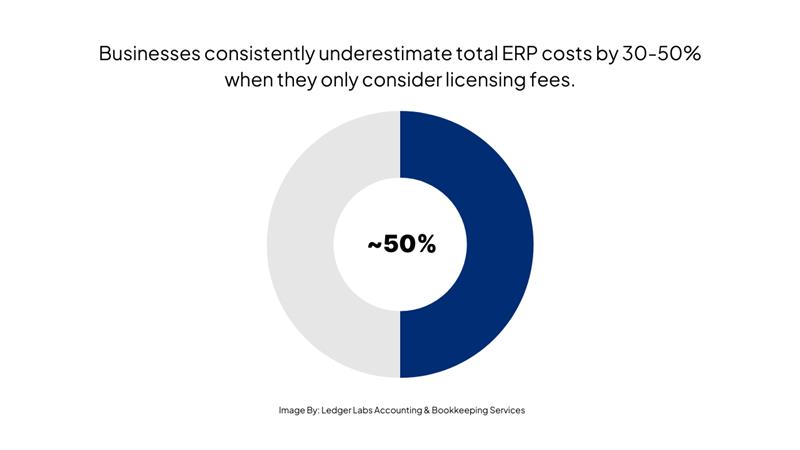
According to Panorama Consulting’s 2024 ERP Report, businesses consistently underestimate total ERP costs by 30-50% when they only consider licensing fees.
The pricing difference between Odoo and Sage isn’t subtle—Odoo typically costs 40-60% less over three years for similarly-sized businesses.
But cost alone doesn’t tell the whole story if one platform forces you to migrate again in five years while the other grows with you indefinitely.
Speaking of growth, let’s talk about what happens when your 10-person startup becomes a 50-person company—and whether your ERP can handle that transition.
How Easy Is the Migration: Sage to Odoo (or Vice Versa)
Now that you’ve seen how each platform handles growth, let’s tackle what happens when you decide to switch between them, because understanding migration difficulty might change your initial choice.
Should you migrate from Sage to Odoo, or are you better off staying put despite the frustrations? The answer isn’t the same for every business.
Sage to Odoo Migration Process
Timeline: 1-6 months, depending on your data volume, customization requirements, and team availability for training.
Step-by-Step Process:
- Weeks 1-2: Data Audit Export all Sage data to CSV format, identify custom fields that need special handling, map your chart of accounts to Odoo’s structure, and document current workflows so you don’t lose operational knowledge.
- Weeks 2-4: CSV Preparation Clean your data (duplicate customers, outdated vendor records), adjust column headers for Odoo compatibility, and validate customer and vendor records against current operations. This is tedious but critical—bad data in means bad data out.
- Weeks 4-6: Test Migration Import data into an Odoo sandbox environment, reconcile account balances against Sage reports, identify gaps in data mapping, and run parallel operations to catch issues before go-live.
- Weeks 6-10: Customization Setup Configure workflows to match your business processes, set user permissions and access controls, integrate third-party apps (payment processors, shipping carriers), and build custom reports your team actually uses.
- Weeks 10-12: User Training Train department by department starting with accounting, run parallel operations where staff use both systems temporarily, and create internal documentation for common tasks.
- Weeks 12-16: Go-Live Execute final data cutover on a Friday afternoon, provide intensive post-migration support Monday morning, and fix inevitable issues that only appear with real-world use.
Migration isn’t something to fear, but it’s definitely something to plan carefully.
The businesses that succeed treat it as a change management project, not just a technical exercise.
Making Your Decision: Odoo vs Sage
Which platform aligns with your business reality, not just your wish list?
Here’s how to know for certain.
Choose Odoo If You...
✅ Are a startup or fast-growing SMB with 1-100 employees who need affordable entry
Points
✅ Need CRM, e-commerce, and operations management in one unified platform
✅ Want to start affordable and scale modularly without forced migrations
✅ Work with modern SaaS tools like Stripe, Shopify, HubSpot, and need seamless integrations
✅ Value customization and developer-friendly APIs for building unique workflows
✅ Operate internationally with multi-currency and multi-language requirements
✅ Have a tech-savvy team or budget to hire an Odoo implementation partner
Best Odoo Use Cases: E-commerce businesses that need inventory synced to online stores, digital agencies managing multiple client projects, tech startups building custom operational workflows, B2B service companies with complex quoting processes, and manufacturing operations with custom production requirements.
Choose Sage If You...
✅ Are in highly regulated industries like construction, real estate, or healthcare
✅ Need industry-specific features out-of-the-box without customization projects
✅ Require advanced payroll with country-specific compliance built-in
✅ Work with a Sage-certified accounting firm that manages your books
✅ Prefer desktop software (Sage 100) over cloud-based alternatives
✅ Need enterprise-grade financial consolidation across 50+ entities
✅ Have budget for premium implementation support and ongoing maintenance
Best Sage Use Cases: Construction companies needing Sage 300 CRE’s job costing features, real estate management firms tracking properties and leases, mid-sized manufacturing using Sage X3 for production planning, healthcare organizations requiring Sage Intacct’s fund accounting, and established SMBs with complex multi-entity accounting needs.
The Bottom Line
Choosing the right ERP shapes your next five years.
Odoo offers flexibility and growth, while Sage delivers proven compliance and structure.
If you want expert Odoo guidance tailored to your workflow, budget, and risk profile, schedule a call with Ledger Labs – and we’ll help you choose the system that fits the first time.